
我正在尝试将文件(任何文件如 exe、apk)转换为灰度图像。我已经使用下面的代码准备了文件的二进制位。但是,我坚持将 8 位分组来表示图像中的一个像素,所以每个像素都是从 0 到 255。文献表明,恶意软件可以通过将其转换为灰度图像并应用 CNN 模型进行分类来进行分类import cv2import numpyimport osimport binasciifilePath = "240387329dee4f03f98a89a2feff9bf30dcba61fcf614cdac24129da54442762"file = open(filePath, "rb")with file: byte = file.read() hexadecimal = binascii.hexlify(byte) decimal = int(hexadecimal, 16) binary = bin(decimal)[2:].zfill(8) print("hex: %s, decimal: %s, binary: %s" % (hexadecimal, decimal, binary))编辑:我写了下面,我固定了图像的宽度。任何反馈?import cv2import numpyimport osimport binasciiimport arrayimport scipy.misc#print (format(5,"b"))filename='240387329dee4f03f98a89a2feff9bf30dcba61fcf614cdac24129da54442762';f=open(filename,'rb');ln = os.path.getsize(filename);width = 500;rem = ln%width;a=array.array("B");a.fromfile(f,ln-rem);f.close;g=numpy.reshape(a,(len(a)/width,width));g= numpy.uint8(g);scipy.misc.imsave('Malware.png',g);
1 回答

吃鸡游戏
TA贡献1829条经验 获得超7个赞
您不需要将数据转换为十六进制或二进制,只需将二进制数据(字节序列)转换为二维数组即可。
问题是没有任何一维数组可以重整为二维数组。
例如,如果字节数是素数 = N,您将获得 1xN 图像(丑陋的单行或单列图像)。
以下示例假设图像尺寸必须为正方形,并根据需要使用填充来完成字节数:
import numpy as np
from math import sqrt, ceil
import cv2
#Input file name (random file I found in my folder).
input_file_name = 'test_cython.cp36-win_amd64.pyd';
#Read the whole file to data
with open(input_file_name, 'rb') as binary_file:
data = binary_file.read()
# Data length in bytes
data_len = len(data)
# d is a verctor of data_len bytes
d = np.frombuffer(data, dtype=np.uint8)
# Assume image shape should be close to square
sqrt_len = int(ceil(sqrt(data_len))) # Compute square toot and round up
# Requiered length in bytes.
new_len = sqrt_len*sqrt_len
# Number of bytes to pad (need to add zeros to the end of d)
pad_len = new_len - data_len
# Pad d with zeros at the end.
# padded_d = np.pad(d, (0, pad_len))
padded_d = np.hstack((d, np.zeros(pad_len, np.uint8)))
# Reshape 1D array into 2D array with sqrt_len pad_len x sqrt_len (im is going to be a Grayscale image).
im = np.reshape(padded_d, (sqrt_len, sqrt_len))
# Save image
cv2.imwrite('im.png', im)
# Display image
cv2.imshow('im' ,im)
cv2.waitKey(0)
cv2.destroyAllWindows()
结果:
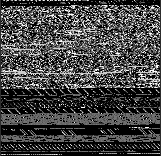
构建可用于恢复原始文件的映像:
如果要获取图像,并恢复原始文件(字节相等,无填充),则需要恢复图像中的原始数据长度。
(您也可以恢复填充的长度)。
以下实现,将原始数据长度存储在前 8 个像素中。
读取图像后,可以去除填充和存储长度,恢复原始文件。
这是一个“编码”和“解码”的例子:
import numpy as np
from math import sqrt, ceil
import cv2
import struct
#Input file name
input_file_name = 'test_cython.cp36-win_amd64.pyd';
#Read the whole file to data
with open(input_file_name, 'rb') as binary_file:
data = binary_file.read()
# Data length in bytes
data_len = len(data)
# d is a verctor of data_len bytes
d = np.frombuffer(data, dtype=np.uint8)
data_len_as_bytes = np.frombuffer(struct.pack("Q", data_len), dtype=np.uint8) # Convert data_len to 8 bytes
data_len = data_len + len(data_len_as_bytes) #Update length to include the 8 bytes
# Set data_len as first 8 bytes of d
d = np.hstack((data_len_as_bytes, d))
# Assume image shape should be close to square
sqrt_len = int(ceil(sqrt(data_len))) # Compute square toot and round up
# Requiered length in bytes.
new_len = sqrt_len*sqrt_len
# Number of bytes to pad (need to add zeros to the end of d)
pad_len = new_len - data_len
# Pad d with zeros at the end.
# padded_d = np.pad(d, (0, pad_len))
padded_d = np.hstack((d, np.zeros(pad_len, np.uint8)))
# Reshape 1D array into 2D array with sqrt_len pad_len x sqrt_len (im is going to be a Grayscale image).
im = np.reshape(padded_d, (sqrt_len, sqrt_len))
# Save image
cv2.imwrite('im.png', im)
# Display image
#cv2.imshow('im' ,im)
#cv2.waitKey(0)
#cv2.destroyAllWindows()
# Restore original data:
##################################
input_file_name = 'test.bin'; #Output file name
im = cv2.imread('im.png', cv2.IMREAD_GRAYSCALE)
# Convert 2D to 1D
padded_d = im.flatten()
# Get original length
data_len_as_bytes = padded_d[0:8]
orig_data_len = struct.unpack("Q", data_len_as_bytes.tobytes())
# Crop the original data bytes (without the padding).
data = padded_d[8:8+orig_data_len[0]]
#Write d whole file to binary file
with open(input_file_name, 'wb') as binary_file:
binary_file.write(data)
现在您可以将任何(小)文件作为图像上传到 Stack Overflow,并让其他人恢复您的文件。
添加回答
举报
0/150
提交
取消