今天要把WebGL中一个非常重要的算法记录下来——raycaster射线法拾取模型。首先我们来了解一下为什么要做模型拾取,我们在做webgl场景交互的时候经常要选中场景中的某个模型,比如鼠标拖拽旋转,平移。为了能做到鼠标交互,就首先要能选中场景中的模型对象,这就要用到模型拾取算法,本文仅讨论射线法模型拾取raycaster。
所谓射线法就是利用一根射线去和场景中的模型进行碰撞,撞到的模型对象就是被拾取到的模型。请看下图
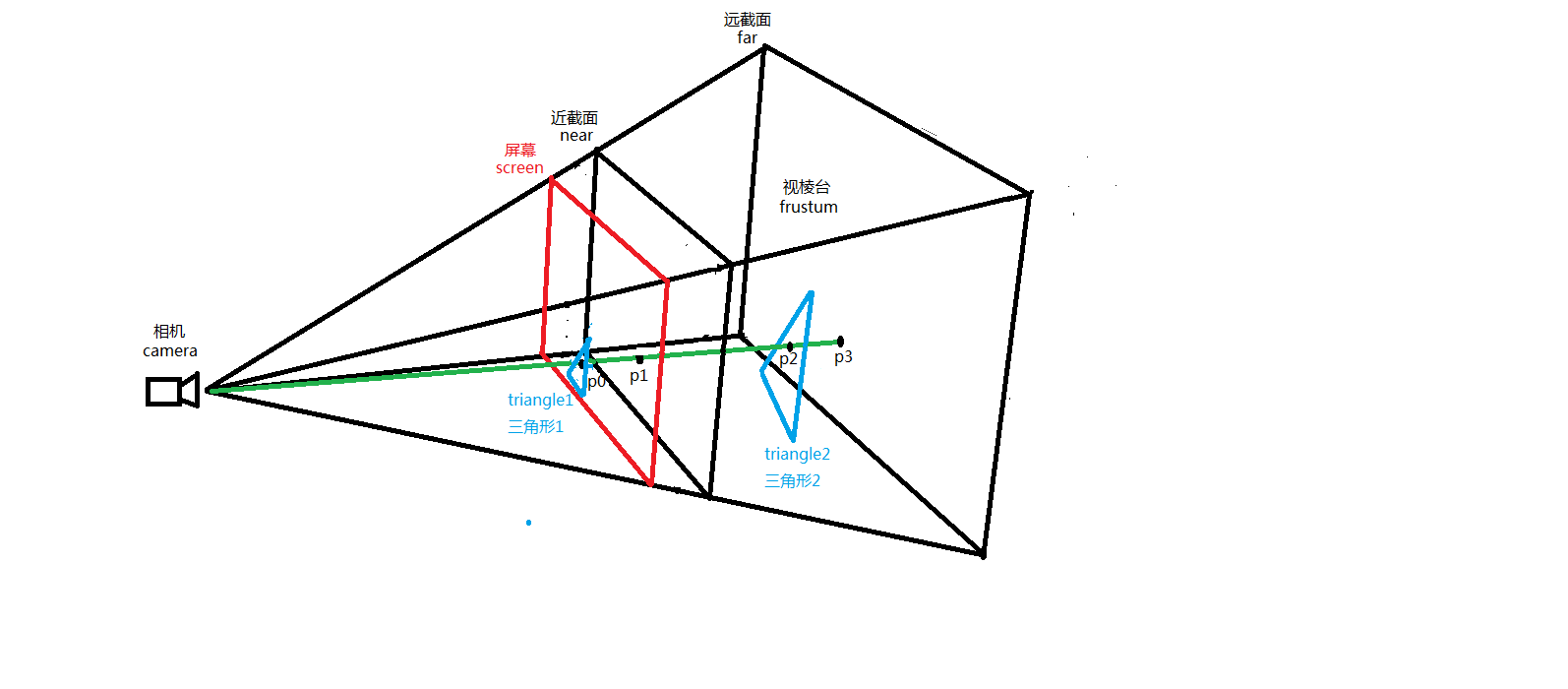
我逐个来解释一下上图中的元素。首先解释相机(camera),这就是人眼的抽象,代表用户在屏幕前的眼睛位置。人眼看到的世界是透视的(perspective),因此我们构造的视棱台(frustum)基于透视投影。整个视棱台区域介于场景近截面(near)和远截面(far)之间,这个区间内的空间就是我们可以看到的场景空间。需要说明一下,near近截面我们这里紧贴屏幕(screen),即距离很小约等于0.1,far远截面就是我们认为的视线最远能看到的距离,我们这里设置为1000。屏幕screen在近截面前0.1的位置上,也是离人眼最近的截面,也是鼠标交互的界面,这是要事先解释明白的。理解了这个空间结构以后我们就开始讲解raycaster的算法原理。
首先我们来看一下鼠标在屏幕上的位置点P0,我们可以看到P0点(鼠标),这个就是鼠标在屏幕上的位置。我们再来看看triangle1三角形1,这就是透视空间中triangle2三角形2在屏幕上的投影。我们可以明显看到鼠标位置P0点在屏幕triangle1三角形1内部,即鼠标点选中triangle1三角形1。这在屏幕上可以看的很清楚,但是问题来了,在空间中鼠标是没有深度概念的,即鼠标只有XY坐标,没有Z坐标,那我们在视棱台的空间坐标系中如何表示鼠标的三维空间位置呢,如果没有鼠标的3维空间坐标,如何判断在视棱台空间中鼠标是否选中triangle2三角形2这个模型对象呢?也许有同学会说,triangle1就是triangle2的投影嘛,选中投影就是选中模型了不是,我就这么说,非常正确,能说出这样的话就已经完全理解了模型在屏幕上的投影的原理,但是新的问题随之又来了,如何获取鼠标点选模型的坐标呢,即如何得到鼠标点在模型上的那个点的三维空间坐标呢,如果仅仅判断是否选中,那投影就够用了,但要计算鼠标点选模型上的点坐标,就远远不够用了。为了解决这个问题,raycaster算法应运而生。
raycaster顾名思义就是射线投射。他的原理其实非常简单,就是用一根射线去交有限平面,获得交点。射线是有起点的,起点就是我们的眼睛。我们做一根起于camera,通过鼠标在屏幕上的位置P0,继续延伸,交视棱台近截面于P1,继续延伸,交视棱台远截面于P3,射线截止,我们得到了一根线段P1-P3。这根线段P1-P3就是我们眼睛能看到的鼠标发出的射线在透视空间中的部分,凡是这根线段碰到的模型,都是鼠标点选中的空间模型。而这根线段和模型的交点就是鼠标点选模型的交点,这个交点坐标就是鼠标点选模型的交点空间三维坐标。这样就顺利解决了上面我们的问题,即求鼠标点选空间三维模型的交点坐标。在上图中我们看得很清楚,这个交点就是P2,接下来我们就来讲解怎么求这个P2的空间坐标。
做图形学的同学们都非常清楚。如何求线段和平面的交点,这里我截取一部分代码,以供叙述方便,以下就是求线段截取平面交点的函数。

/*

 */let Intersector = require('./Intersector');
let LineSegmentIntersection = require('./Intersection').LineSegmentIntersection;
let Vec3 = require('./Vec3');
let Mat4 = require('./Mat4');
let Algorithm = require('./Algorithm');

let LineSegmentIntersector = function () {
    Intersector.call(this);    //原始的起始点和临界值,初始化设置的数据,保留作为参照,设置后不再变动
    this._orginStart = Vec3.new();//线段起点
    this._orginEnd = Vec3.new();//线段终点
    this._orginThreshold = 0.0;//点和线求相交时的临界值,完全相交是很难求到的    //临时存储,每次求交都可能会变动的数据    //对于有变换的几何求交,不会变换几何顶点而是变换起始点和临界值
    this._start = Vec3.new();//线段起点
    this._end = Vec3.new();//线段终点
    this._threshold = 0.0;//点和线求相交时的临界值,完全相交是很难求到的

    this._direction = Vec3.new();    this._length = 0;    this._inverseLength = 0;    this._matrix = Mat4.new();
};

LineSegmentIntersector.prototype = Object.create(Intersector.prototype);
LineSegmentIntersector.prototype.constructor = LineSegmentIntersector;
Object.assign(LineSegmentIntersector.prototype, {
    init: function (start, end, threshold) {
        Vec3.copy(this._orginStart, start);
        Vec3.copy(this._orginEnd, end);
        Vec3.copy(this._start, start);
        Vec3.copy(this._end, end);        if (threshold !== undefined) {            this._orginThreshold = threshold;            this._threshold = threshold;
        }
    },
    intersect: function (drawable) {        //先使用包围盒子
        if (!drawable.getBoundingBox().intersectLineSegment(this._orginStart, this._orginEnd)) {            return;
        }        this._drawable = drawable;
        let geometry = drawable.getGeometry();
        let vertexbuffer = geometry.getBufferArray('Vertex');        this._vertices = vertexbuffer.getArrayBuffer();        //没有顶点数据不处理直接返回
        if (!this._vertices) return;        //没有图元不处理直接返回
        let primitive = geometry.getPrimitive();        if (!primitive) return;        //初始化求相交的各种数据
        let matrix = drawable.getTransform();        if (this._transform !== matrix) {//如果不一样,需要计算新的起始点以及各种临时数据
            this._transform = matrix;
            Mat4.invert(this._matrix, matrix);            //根据矩阵计算新的临界值
            if (this._orginThreshold > 0.0) {
                let tmp = this._start;
                Mat4.getScale(tmp, this._matrix);
                let x = tmp[0];
                let y = tmp[1];
                let z = tmp[2];                this._threshold = this._orginThreshold * (x > y ? (x > z ? x : z) : y > z ? y : z);
            }            //根据矩阵计算新的起始点
            Vec3.transformMat4(this._start, this._orginStart, this._matrix);
            Vec3.transformMat4(this._end, this._orginEnd, this._matrix);            //根据新的起始点计算各种临时数据
            Vec3.sub(this._direction, this._end, this._start);            this._length = Vec3.length(this._direction);//长度
            this._inverseLength = this._length <= Algorithm.EPSILON ? 0.0 : 1.0 / this._length;
            Vec3.scale(this._direction, this._direction, this._inverseLength);//求单位向量
        }//如果变换与上次一样,直接使用上次的数据求相交        //求相交
        primitive.operate(this);
    },
    intersectPoint: function (vertex) {        // https://www.geometrictools.com/GTEngine/Include/Mathematics/GteDistPointSegment.h
        //起点指向绘制点,向量M
        let m = Vec3.MemoryPool.alloc();
        Vec3.sub(m, vertex, this._start);        //起点指向终点,向量N
        let n = Vec3.MemoryPool.alloc();
        Vec3.sub(n, this._end, this._start);        //求M在N上的投影比例值        //|m|*|n|*cos / \n\*\n\ = |m|*cos/\n\
        let r = Vec3.dot(m, n) * this._inverseLength * this._inverseLength;        //计算绘制点到线段的距离
        let sqrdist = 1.0;        if (r < 0.0) {//夹角超过90度,绘制点在当前线段起点后面,求绘制点与起点的距离
            sqrdist = Vec3.sqrLen(m);
        } else if (r > 1.0) {//绘制点在当前线段终点后面,求绘制点与终点的距离
            sqrdist = Vec3.sqrDist(vertex, this._end);
        } else {//在0到1之间            //m - n * r 如果平行或者接近于平行,结果接近于0,相交
            sqrdist = Vec3.sqrLen(Vec3.scaleAndAdd(m, m, n, -r));
        }

        let intersection = undefined;        if (sqrdist > this._threshold * this._threshold) {//超过了临界值,没有相交返回
        } else {            //相交
            intersection = new LineSegmentIntersection();            //intersection._i1 = index;            //intersection._r1 = 1.0;
            Vec3.scaleAndAdd(intersection._point, this._start, n, r);
            intersection._ratio = r;
        }
        Vec3.MemoryPool.free(m);
        Vec3.MemoryPool.free(n);        return intersection;
    },
    intersectLine: function (vertex0, vertex1) {        // https://www.geometrictools.com/GTEngine/Samples/Geometrics/DistanceSegments3/DistanceSegments3.cpp
        //let epsilon = 0.00000001;        //起点到终点的向量
        let u = Vec3.MemoryPool.alloc();
        Vec3.sub(u, vertex1, vertex0);
        let v = Vec3.MemoryPool.alloc();
        Vec3.sub(v, this._end, this._start);
        let w = Vec3.MemoryPool.alloc();
        Vec3.sub(w, vertex0, this._start);

        let a = Vec3.dot(u, u);
        let b = Vec3.dot(u, v);
        let c = Vec3.dot(v, v);
        let d = Vec3.dot(u, w);
        let e = Vec3.dot(v, w);
        let D = a * c - b * b;
        let sN;
        let tN;
        let sD = D;
        let tD = D;        // compute the line parameters of the two closest points
        if (D < Algorithm.EPSILON) {//平行            // the lines are almost parallel
            sN = 0.0; // force using point P0 on segment S1
            sD = 1.0; // to prevent possible division by 0.0 later
            tN = e;
            tD = c;
        } else {            // get the closest points on the infinite lines
            sN = b * e - c * d;
            tN = a * e - b * d;            if (sN < 0.0) {                // sc < 0 => the s=0 edge is visible
                sN = 0.0;
                tN = e;
                tD = c;
            } else if (sN > sD) {                // sc > 1  => the s=1 edge is visible
                sN = sD;
                tN = e + b;
                tD = c;
            }
        }        if (tN < 0.0) {            // tc < 0 => the t=0 edge is visible
            tN = 0.0;            // recompute sc for this edge
            if (-d < 0.0) sN = 0.0;            else if (-d > a) sN = sD;            else {
                sN = -d;
                sD = a;
            }
        } else if (tN > tD) {            // tc > 1  => the t=1 edge is visible
            tN = tD;            // recompute sc for this edge
            if (-d + b < 0.0) sN = 0;            else if (-d + b > a) sN = sD;            else {
                sN = -d + b;
                sD = a;
            }
        }        // finally do the division to get sc and tc
        let sc = Math.abs(sN) < Algorithm.EPSILON ? 0.0 : sN / sD;
        let tc = Math.abs(tN) < Algorithm.EPSILON ? 0.0 : tN / tD;        // get the difference of the two closest points
        let closest0 = Vec3.MemoryPool.alloc();
        let closest1 = Vec3.MemoryPool.alloc();
        Vec3.scaleAndAdd(closest0, vertex0, u, sc);
        Vec3.scaleAndAdd(closest1, this._start, v, tc);

        let sqrDistance = Vec3.sqrDist(closest0, closest1);
        Vec3.MemoryPool.free(closest0);
        Vec3.MemoryPool.free(closest1);

        let intersection = undefined;        if (sqrDistance > this._threshold * this._threshold) {

        } else {            //相交
            intersection = new LineSegmentIntersection();            // intersection._i1 = index0;            // intersection._i2 = index1;            // intersection._r1 = 1.0 - tc;            // intersection._r2 = tc;            Vec3.copy(intersection._point, closest1);
            intersection._ratio = tc;
        }
        Vec3.MemoryPool.free(u);
        Vec3.MemoryPool.free(v);
        Vec3.MemoryPool.free(w);        return intersection;
    },
    intersectTriangle: function (vertex0, vertex1, vertex2) {
        let e2 = Vec3.MemoryPool.alloc();
        Vec3.sub(e2, vertex2, vertex0);
        let e1 = Vec3.MemoryPool.alloc();
        Vec3.sub(e1, vertex1, vertex0);
        let pvec = Vec3.MemoryPool.alloc();
        Vec3.cross(pvec, this._direction, e2);

        let intersection = undefined;        //线段与三角面点积
        let det = Vec3.dot(pvec, e1);        //判断三角形所在的平面与线段是否平行,如果平行铁定不相交,面片没有厚度
        if (Math.abs(det) < Algorithm.EPSILON) {            //return undefined;
        }else{
            let invDet = 1.0 / det;
            let tvec = Vec3.MemoryPool.alloc();
            Vec3.sub(tvec, this._start, vertex0);
            let u = Vec3.dot(pvec, tvec) * invDet;            //三角面超出了线段两个点范围外面,铁定不相交
            if (u < 0.0 || u > 1.0) {                //return undefined;
            }else{
                let qvec = Vec3.MemoryPool.alloc();
                Vec3.cross(qvec, tvec, e1);
                let v = Vec3.dot(qvec, this._direction) * invDet;                //                if (v < 0.0 || u + v > 1.0) {                    //return undefined;
                }else{
                    let t = Vec3.dot(qvec, e2) * invDet;                    if (t < Algorithm.EPSILON || t > this._length) {                        //return undefined;
                    }else{                        //相交
                        intersection = new LineSegmentIntersection();                        //求相交点
                        let r0 = 1.0 - u - v;
                        let r1 = u;
                        let r2 = v;
                        let r = t * this._inverseLength;
                        let interX = vertex0[0] * r0 + vertex1[0] * r1 + vertex2[0] * r2;
                        let interY = vertex0[1] * r0 + vertex1[1] * r1 + vertex2[1] * r2;
                        let interZ = vertex0[2] * r0 + vertex1[2] * r1 + vertex2[2] * r2;                        // intersection._i1 = index0;                        // intersection._i2 = index1;                        // intersection._i3 = index2;                        // intersection._r1 = r0;                        // intersection._r2 = r1;                        // intersection._r3 = r2;                        //这里的点没有经过变换,不是真实的世界坐标点
                        Vec3.set(intersection._point, interX, interY, interZ);
                        Vec3.transformMat4(intersection._point, intersection._point, this._transform);                        //求法向量,法向量未变换,如果有用途也要变换
                        let normal = intersection._normal;
                        Vec3.cross(normal, e1, e2);
                        Vec3.normalize(normal, normal);                        //比例,在相交线段上的比例,不需要变换
                        intersection._ratio = r;
                     }
                }
                Vec3.MemoryPool.free(qvec);
            }
            Vec3.MemoryPool.free(tvec);
        }
        Vec3.MemoryPool.free(e1);
        Vec3.MemoryPool.free(e2);
        Vec3.MemoryPool.free(pvec);        return intersection;        // http://gamedev.stackexchange.com/questions/54505/negative-scale-in-matrix-4x4
        // https://en.wikipedia.org/wiki/Determinant#Orientation_of_a_basis        // you can't exactly extract scale of a matrix but the determinant will tell you        // if the orientation is preserved        //intersection._backface = mat4.determinant(intersection._matrix) * det < 0;    },
    intersectBoundingBox: function (box) {        return box.intersectLineSegment(this._orginStart, this._orginEnd);
    },
});

module.exports = LineSegmentIntersector;// setDrawable: function (drawable) {//     this._geometry = drawable.getGeometry();//     this._vertices = this._geometry.getBufferArray('Vertex');////     let matrix = drawable.getTransform();//     if (this._transform === matrix) {//如果与上次的一样,不再处理//         return;//     }////     //如果不一样,需要计算新的起始点已经各种临时数据//     this._transform = matrix;//     Mat4.invert(this._matrix, matrix);////     //根据矩阵计算新的临界值//     if (this._orginThreshold > 0.0) {//         let tmp = this._start;//         Mat4.getScale(tmp, this._matrix);//         let x = tmp[0];//         let y = tmp[1];//         let z = tmp[2];//         this._threshold = this._orginThreshold * (x > y ? (x > z ? x : z) : y > z ? y : z);//     }//     //根据矩阵计算新的起始点//     Vec3.transformMat4(this._start, this._orginStart, this._matrix);//     Vec3.transformMat4(this._end, this._orginEnd, this._matrix);////     //根据新的起始点计算各种临时数据//     Vec3.sub(this._direction, this._end, this._start);//     this._length = Vec3.length(this._direction);//长度//     this._inverseLength = this._length <= Algorithm.EPSILON ? 1.0 / this._length : 0.0;//     Vec3.scale(this._direction, this._direction, this._inverseLength);//求单位向量// },// setGeometry: function (geometry, matrix) {//     Intersector.prototype.setGeometry.call(this, geometry, matrix);////     //如果不一样,需要计算新的起始点已经各种临时数据//     Mat4.invert(this._matrix, matrix);////     //根据矩阵计算新的临界值//     if (this._orginThreshold > 0.0) {//         let tmp = this._start;//         Mat4.getScale(tmp, this._matrix);//         let x = tmp[0];//         let y = tmp[1];//         let z = tmp[2];//         this._threshold = this._orginThreshold * (x > y ? (x > z ? x : z) : y > z ? y : z);//     }//     //根据矩阵计算新的起始点//     Vec3.transformMat4(this._start, this._orginStart, this._matrix);//     Vec3.transformMat4(this._end, this._orginEnd, this._matrix);////     //根据新的起始点计算各种临时数据//     Vec3.sub(this._direction, this._end, this._start);//     this._length = Vec3.length(this._direction);//长度//     this._inverseLength = this._length <= Algorithm.EPSILON ? 1.0 / this._length : 0.0;//     Vec3.scale(this._direction, this._direction, this._inverseLength);//求单位向量// },// setGeometry: function (geometry) {//     //没有顶点数据不处理直接返回//     let vertexbuffer = geometry.getBufferArray('Vertex');//     if(!vertexbuffer) return;////     //没有图元不处理直接返回//     let primitive = geometry.getPrimitive();//     if (primitive)//         primitive.operate(this);// },
以上的LineSegmentIntersector就是计算线段和平面交点的类,具体算法不再赘述,请自行参考《WebGL编程指南》。好了,我们接下来就看一个项目中的具体案例,请看下图
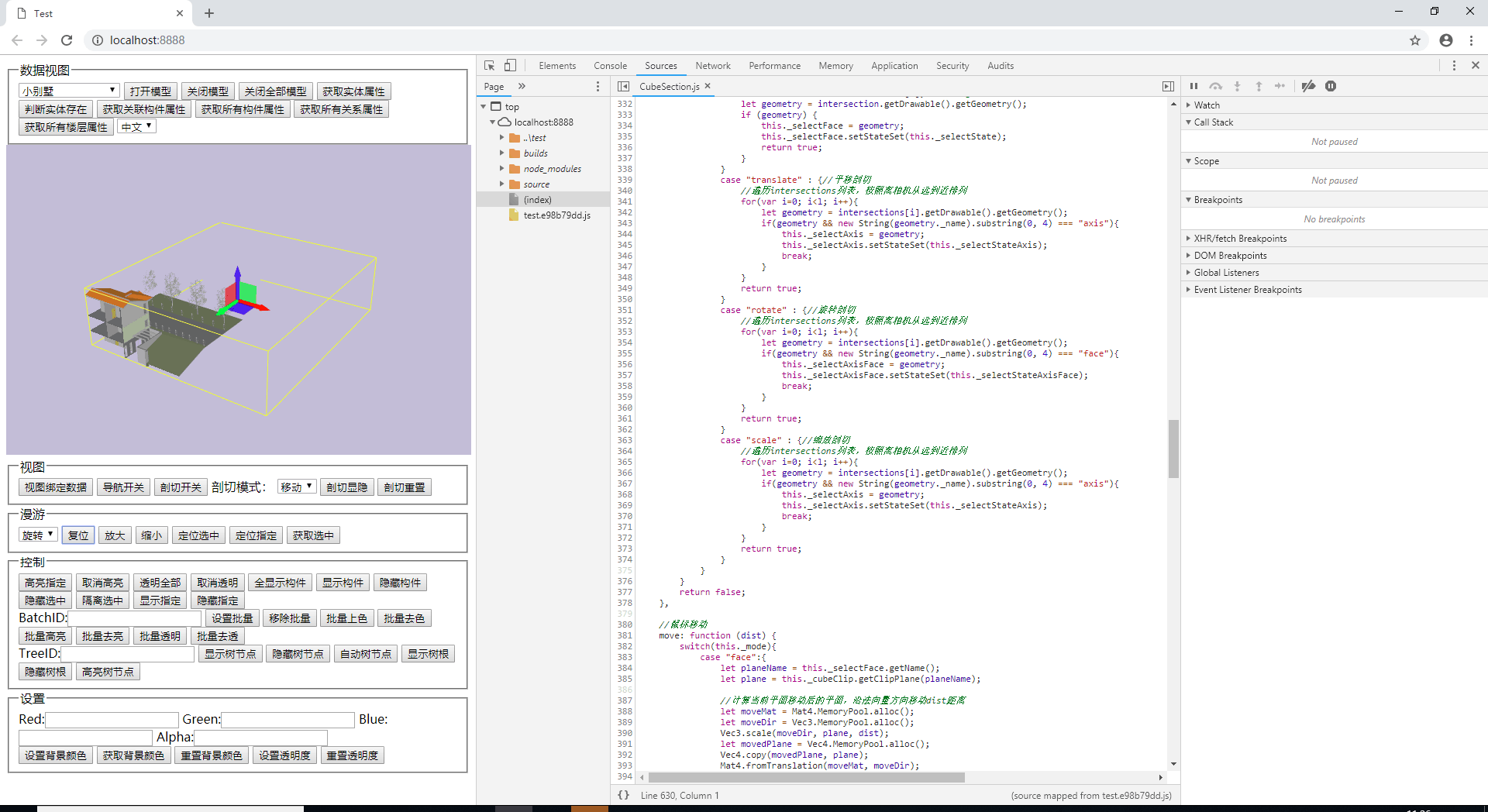
我们在pick事件中使用了LineSegmentIntersector对场景中的包围盒和坐标系模型进行了raycaster射线碰撞检测,结果我们得到了一系列的返回对象,其中包括包围盒的2个面,坐标系的一根坐标轴的geometry,这就另我们觉得难办了,鼠标射线碰到了不止一个模型,我们该怎么办呢,这里就要说明一下,一般我们都取离near近截面最近的一个模型作为我们pick选中的模型,因为其他模型都被处于前方的该模型遮挡住了。
好了,今天对raycaster的解释就结束了,只是初步了解一下,raycaster还有很多应用场景,这里和我们的鼠标拾取不相关的就不介绍了,谢谢大家阅读,欢迎大家一起留言探讨,再次感谢。转载本文请注明出处:https://www.cnblogs.com/ccentry/p/9973165.html
共同学习,写下你的评论
评论加载中...
作者其他优质文章