


前言
在之前的 Dubbo 服务开发中,我们一般使用 Zookeeper 作为注册中心,同时还需要部署 Dubbo 监控中心和管理后台。
Nacos 注册中心
Nacos 是阿里巴巴的开源的项目,全称 Naming Configuration Service ,专注于服务发现和配置管理领域。
Nacos 致力于帮助您发现、配置和管理微服务。Nacos 提供了一组简单易用的特性集,帮助您快速实现动态服务发现、服务配置、服务元数据及流量管理。
Nacos 生态图
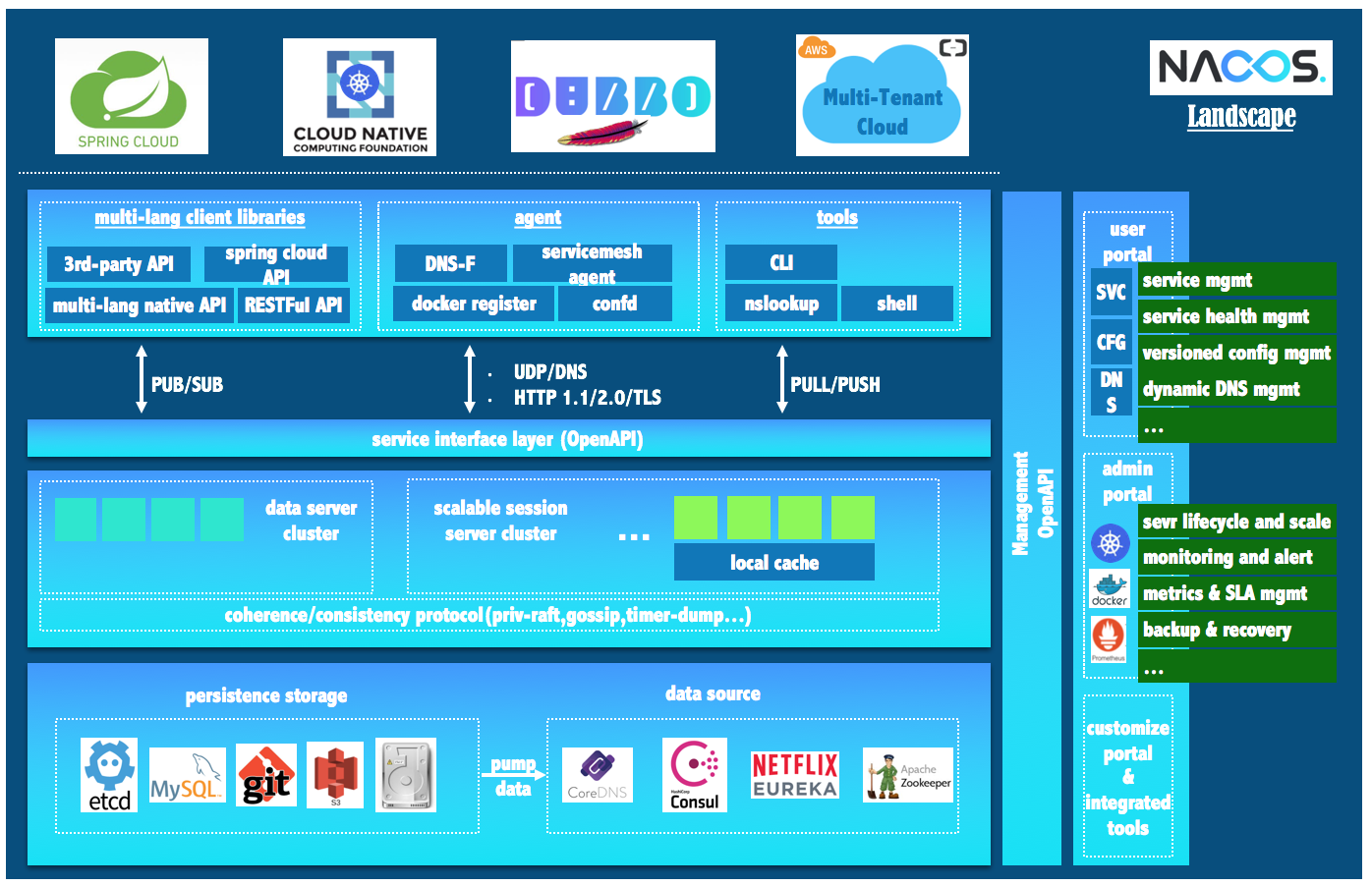
如 Nacos 全景图所示,Nacos 无缝支持一些主流的开源生态,例如
Spring Cloud
Apache Dubbo and Dubbo Mesh TODO
Kubernetes and CNCF TODO。
使用 Nacos 简化服务发现、配置管理、服务治理及管理的解决方案,让微服务的发现、管理、共享、组合更加容易。
Nacos Spring Boot 快速开始
<!-- Dubbo Nacos registry dependency -->
<dependency>
	<groupId>com.alibaba</groupId>
	<artifactId>dubbo-registry-nacos</artifactId>
	<version>2.6.7</version>
</dependency>
<!-- Dubbo dependency -->
<dependency>
	<groupId>com.alibaba</groupId>
	<artifactId>dubbo</artifactId>
	<version>2.6.5</version>
</dependency>
<!-- Alibaba Spring Context extension -->
<dependency>
	<groupId>com.alibaba.spring</groupId>
	<artifactId>spring-context-support</artifactId>
	<version>1.0.2</version>
</dependency>
<!--Dubbo 依赖-->
<dependency>
	<groupId>io.netty</groupId>
	<artifactId>netty-all</artifactId>
	<version>4.1.32.Final</version>
</dependency>
配置文件:
## application
dubbo.application.name = spring-boot-pay
dubbo.registry.address = nacos://47.104.197.9:8848
dubbo.protocol.name=dubbo
dubbo.protocol.port=-1
启动类引入 Dubbo 注解:
@EnableDubbo
@SpringBootApplication
public class Application {

	private static final Logger logger = LoggerFactory.getLogger(AliPayServiceImpl.class);

	public static void main(String[] args){
		SpringApplication.run(Application.class, args);
		logger.info("启动成功");
	}
}
接口实现:
//省略部分代码
import com.alibaba.dubbo.config.annotation.Service;
@Service(group = "itstyle-nacos", retries = 1, timeout = 10000)
public class AliPayServiceImpl implements IAliPayService {

}
打包接口:
<!-- 打包接口 https://blog.52itstyle.vip -->
       <plugin>
				<groupId>org.apache.maven.plugins</groupId>
				<artifactId>maven-jar-plugin</artifactId>
				<executions>
					<execution>
						<id>service</id>
						<phase>package</phase>
						<goals>
							<goal>jar</goal>
						</goals>
						<configuration>
							<classesDirectory>${project.build.directory}/classes</classesDirectory>
							<finalName>pay-service</finalName>
							<outputDirectory>${project.build.directory}</outputDirectory>
							<includes>
								<include>com/itstyle/modules/alipay/service/*.*</include>
								<include>com/itstyle/modules/unionpay/service/*.*</include>
								<include>com/itstyle/modules/weixinpay/service/*.*</include>
								<include>com/itstyle/common/model/*.*</include>
							</includes>
						</configuration>
					</execution>
				</executions>
		</plugin>
服务引用:
/**
 * 支付宝支付
 * 创建者 爪哇笔记 https://blog.52itstyle.vip
 * 创建时间	2019年7月20日
 */
@Controller
@RequestMapping(value = "alipay")
public class AliPayController {
	@Reference
	private IAliPayService aliPayService;

}
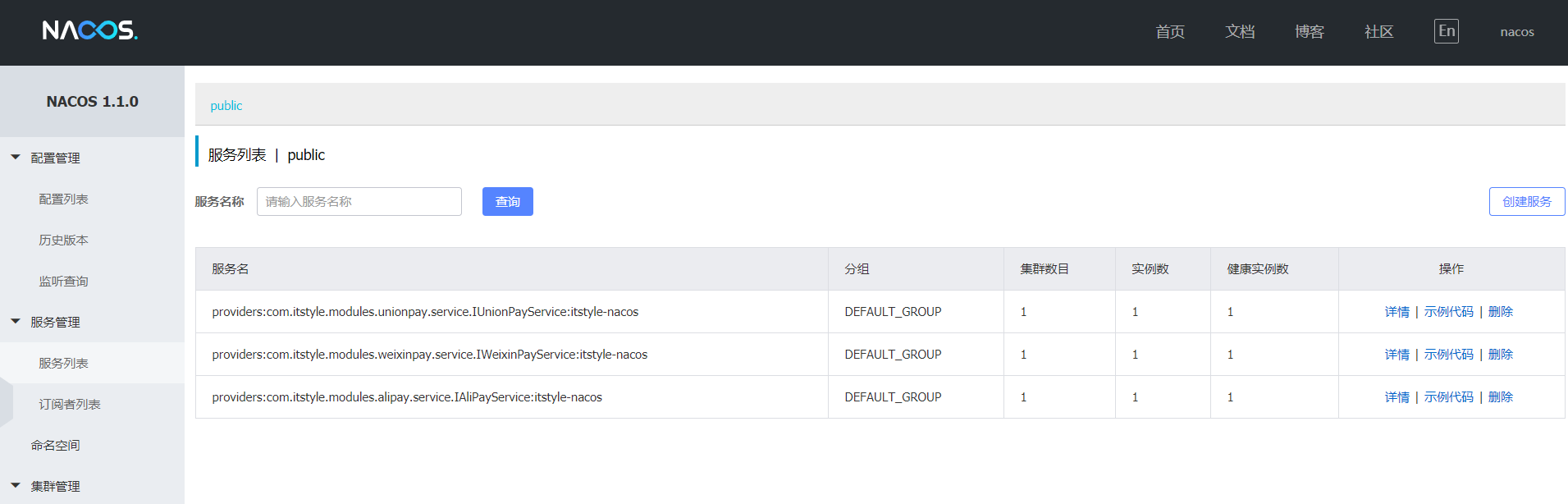
启动项目,登录到管理控制中心,如果发现有数据,说明注册成功。
小结
一个 Nacos 就轻松搞定了,还捎带着配置管理中心,一举两得,何乐不为。
参考案例
点击查看更多内容
2人点赞
评论
共同学习,写下你的评论
评论加载中...
作者其他优质文章
正在加载中



感谢您的支持,我会继续努力的~
扫码打赏,你说多少就多少
赞赏金额会直接到老师账户
支付方式
打开微信扫一扫,即可进行扫码打赏哦