简书 占小狼 转载请注明原创出处,谢谢!
前言
Java NIO 由以下几个核心部分组成:
1 、Buffer
2、Channel
3、Selector
传统的IO操作面向数据流,意味着每次从流中读一个或多个字节,直至完成,数据没有被缓存在任何地方。
NIO操作面向缓冲区,数据从Channel读取到Buffer缓冲区,随后在Buffer中处理数据。
本文着重介绍Channel和Buffer的概念以及在文件读写方面的应用和内部实现原理。
Buffer
A buffer is a linear, finite sequence of elements of a specific primitive type.
一块缓存区,内部使用字节数组存储数据,并维护几个特殊变量,实现数据的反复利用。
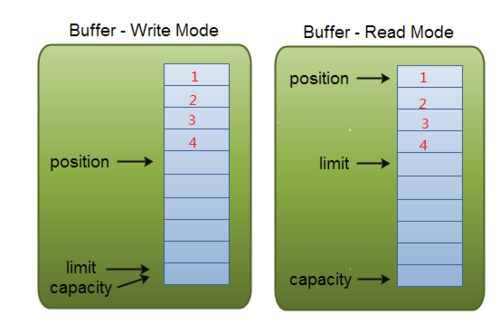
1、mark:初始值为-1,用于备份当前的position;
2、position:初始值为0,position表示当前可以写入或读取数据的位置,当写入或读取一个数据后,position向前移动到下一个位置;
3、limit:写模式下,limit表示最多能往Buffer里写多少数据,等于capacity值;读模式下,limit表示最多可以读取多少数据。
4、capacity:缓存数组大小
mark():把当前的position赋值给mark
public final Buffer mark() {
    mark = position;    return this;
}reset():把mark值还原给position
public final Buffer reset() {    int m = mark;    if (m < 0)        throw new InvalidMarkException();
    position = m;    return this;
}clear():一旦读完Buffer中的数据,需要让Buffer准备好再次被写入,clear会恢复状态值,但不会擦除数据。
public final Buffer clear() {
    position = 0;
    limit = capacity;
    mark = -1;    return this;
}flip():Buffer有两种模式,写模式和读模式,flip后Buffer从写模式变成读模式。
public final Buffer flip() {
    limit = position;
    position = 0;
    mark = -1;    return this;
}rewind():重置position为0,从头读写数据。
public final Buffer rewind() {
    position = 0;
    mark = -1;    return this;
}
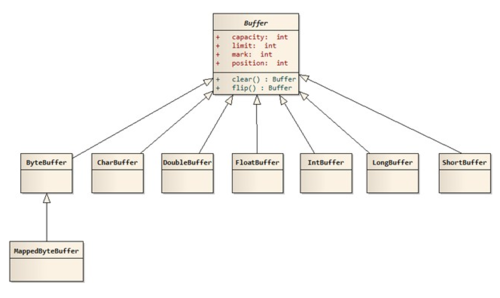
目前Buffer的实现类有以下几种:
ByteBuffer
CharBuffer
DoubleBuffer
FloatBuffer
IntBuffer
LongBuffer
ShortBuffer
MappedByteBuffer
ByteBuffer
A byte buffer,extend from Buffer
ByteBuffer的实现类包括"HeapByteBuffer"和"DirectByteBuffer"两种。
HeapByteBuffer
public static ByteBuffer allocate(int capacity) {    if (capacity < 0)        throw new IllegalArgumentException();    return new HeapByteBuffer(capacity, capacity);
}
HeapByteBuffer(int cap, int lim) {
    super(-1, 0, lim, cap, new byte[cap], 0);
}
HeapByteBuffer通过初始化字节数组hd,在虚拟机堆上申请内存空间。
DirectByteBuffer
public static ByteBuffer allocateDirect(int capacity) {    return new DirectByteBuffer(capacity);
}
DirectByteBuffer(int cap) {    super(-1, 0, cap, cap);    boolean pa = VM.isDirectMemoryPageAligned();    int ps = Bits.pageSize();    long size = Math.max(1L, (long)cap + (pa ? ps : 0));
    Bits.reserveMemory(size, cap);    long base = 0;    try {
        base = unsafe.allocateMemory(size);
    } catch (OutOfMemoryError x) {
        Bits.unreserveMemory(size, cap);        throw x;
    }
    unsafe.setMemory(base, size, (byte) 0);    if (pa && (base % ps != 0)) {        // Round up to page boundary
        address = base + ps - (base & (ps - 1));
    } else {
        address = base;
    }
    cleaner = Cleaner.create(this, new Deallocator(base, size, cap));
    att = null;
}
DirectByteBuffer通过unsafe.allocateMemory申请堆外内存,并在ByteBuffer的address变量中维护指向该内存的地址。
unsafe.setMemory(base, size, (byte) 0)方法把新申请的内存数据清零。
Channel
A channel represents an open connection to an entity such as a hardware device, a file, a network socket, or a program component that is capable of performing one or more distinct I/O operations, for example reading or writing.
NIO把它支持的I/O对象抽象为Channel,Channel又称“通道”,类似于原I/O中的流(Stream),但有所区别:
1、流是单向的,通道是双向的,可读可写。
2、流读写是阻塞的,通道可以异步读写。
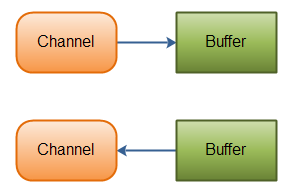
3、流中的数据可以选择性的先读到缓存中,通道的数据总是要先读到一个缓存中,或从缓存中写入,如下所示:
目前已知Channel的实现类有:
FileChannel
DatagramChannel
SocketChannel
ServerSocketChannel
FileChannel
A channel for reading, writing, mapping, and manipulating a file.
一个用来写、读、映射和操作文件的通道。
FileChannel的read、write和map通过其实现类FileChannelImpl实现。
read实现
public int read(ByteBuffer dst) throws IOException {
    ensureOpen();    if (!readable)        throw new NonReadableChannelException();    synchronized (positionLock) {        int n = 0;        int ti = -1;        try {
            begin();
            ti = threads.add();            if (!isOpen())                return 0;            do {
                n = IOUtil.read(fd, dst, -1, nd);
            } while ((n == IOStatus.INTERRUPTED) && isOpen());            return IOStatus.normalize(n);
        } finally {
            threads.remove(ti);
            end(n > 0);            assert IOStatus.check(n);
        }
    }
}
FileChannelImpl的read方法通过IOUtil的read实现:
static int read(FileDescriptor fd, ByteBuffer dst, long position,
                NativeDispatcher nd) IOException {    if (dst.isReadOnly())        throw new IllegalArgumentException("Read-only buffer");    if (dst instanceof DirectBuffer)        return readIntoNativeBuffer(fd, dst, position, nd);    // Substitute a native buffer
    ByteBuffer bb = Util.getTemporaryDirectBuffer(dst.remaining());    try {        int n = readIntoNativeBuffer(fd, bb, position, nd);
        bb.flip();        if (n > 0)
            dst.put(bb);        return n;
    } finally {
        Util.offerFirstTemporaryDirectBuffer(bb);
    }
}
通过上述实现可以看出,基于channel的文件数据读取步骤如下:
1、申请一块和缓存同大小的DirectByteBuffer bb。
2、读取数据到缓存bb,底层由NativeDispatcher的read实现。
3、把bb的数据读取到dst(用户定义的缓存,在jvm中分配内存)。
read方法导致数据复制了两次。
write实现
public int write(ByteBuffer src) throws IOException {
    ensureOpen();    if (!writable)        throw new NonWritableChannelException();    synchronized (positionLock) {        int n = 0;        int ti = -1;        try {
            begin();
            ti = threads.add();            if (!isOpen())                return 0;            do {
                n = IOUtil.write(fd, src, -1, nd);
            } while ((n == IOStatus.INTERRUPTED) && isOpen());            return IOStatus.normalize(n);
        } finally {
            threads.remove(ti);
            end(n > 0);            assert IOStatus.check(n);
        }
    }
}
和read实现一样,FileChannelImpl的write方法通过IOUtil的write实现:
static int write(FileDescriptor fd, ByteBuffer src, long position,
                 NativeDispatcher nd) throws IOException {    if (src instanceof DirectBuffer)        return writeFromNativeBuffer(fd, src, position, nd);    // Substitute a native buffer
    int pos = src.position();    int lim = src.limit();    assert (pos <= lim);    int rem = (pos <= lim ? lim - pos : 0);
    ByteBuffer bb = Util.getTemporaryDirectBuffer(rem);    try {
        bb.put(src);
        bb.flip();        // Do not update src until we see how many bytes were written
        src.position(pos);        int n = writeFromNativeBuffer(fd, bb, position, nd);        if (n > 0) {            // now update src
            src.position(pos + n);
        }        return n;
    } finally {
        Util.offerFirstTemporaryDirectBuffer(bb);
    }
}
通过上述实现可以看出,基于channel的文件数据写入步骤如下:
1、申请一块DirectByteBuffer,bb大小为byteBuffer中的limit - position。
2、复制byteBuffer中的数据到bb中。
3、把数据从bb中写入到文件,底层由NativeDispatcher的write实现,具体如下:
private static int writeFromNativeBuffer(FileDescriptor fd,
        ByteBuffer bb, long position, NativeDispatcher nd)
    throws IOException {    int pos = bb.position();    int lim = bb.limit();    assert (pos <= lim);    int rem = (pos <= lim ? lim - pos : 0);    int written = 0;    if (rem == 0)        return 0;    if (position != -1) {
        written = nd.pwrite(fd,
                            ((DirectBuffer)bb).address() + pos,
                            rem, position);
    } else {
        written = nd.write(fd, ((DirectBuffer)bb).address() + pos, rem);
    }    if (written > 0)
        bb.position(pos + written);    return written;
}
write方法也导致了数据复制了两次
Channel和Buffer示例
File file = new RandomAccessFile("data.txt", "rw");
FileChannel channel = file.getChannel();
ByteBuffer buffer = ByteBuffer.allocate(48);int bytesRead = channel.read(buffer);while (bytesRead != -1) {
    System.out.println("Read " + bytesRead);
    buffer.flip();    while(buffer.hasRemaining()){
        System.out.print((char) buffer.get());
    }
    buffer.clear();
    bytesRead = channel.read(buffer);
}
file.close();
注意buffer.flip() 的调用,首先将数据写入到buffer,然后变成读模式,再从buffer中读取数据。
总结
通过本文的介绍,希望大家对Channel和Buffer在文件读写方面的应用和内部实现有了一定了解,努力做到不被一叶障目。
作者:占小狼
链接:https://www.jianshu.com/p/052035037297
共同学习,写下你的评论
评论加载中...
作者其他优质文章