

整体思路:
外层Stack布局,里面TextInput组件用来调起键盘,Row布局中循环出四个Text组件,Row布局覆盖在TextInput组件上,用来展示输入的数字。
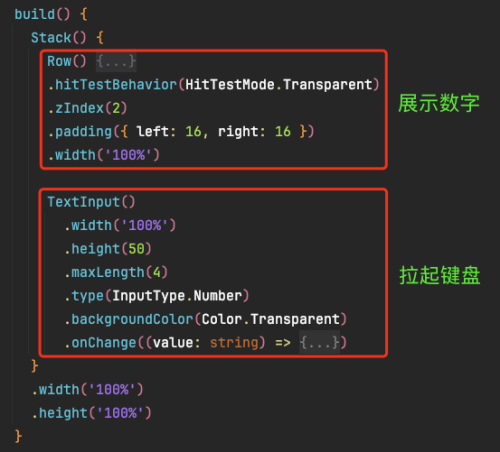
定义两个参数,code用来接受输入的文本,someArray用来做为想要展示的Text组件数量,其中的数字用来和code的长度做比较,来区分输入框是否写入文本。
  @State code: string = ''
  someArray: number[] = [1, 2, 3, 4]
这里循环someArray,Text组件未填入时显示 ‘-’并且即将写入数字的Text组件有橙色高亮,当四个输入框都有数字时,最后一个框高亮。
      Row() {
        ForEach(this.someArray, (item: number, index: number) => {
          if (item != 1) {
            Blank() // 除了第一个TextView自定义组件以外,其他三个的左边都添加一个Blank()组件
          }
          if (this.code.length >= item) {
            // 填过数字的输入框才满足这个条件, 且只有填到最后一个数字的时候isBorder才为true
            this.codeOne({ code: this.code.substring(item - 1, item), isBorder: item == 4 })
          } else {
            // 未填数字的输入框,显示'-',并且即将要输入的框为橙色
            this.codeOne({ code: '-', isBorder: this.code.length + 1 == item })
          }
        }, (item: number) => JSON.stringify(item))
      }
      .hitTestBehavior(HitTestMode.Transparent)
      .zIndex(2)
      .padding({ left: 16, right: 16 })
      .width('100%')
@Builder
codeOne($$: SMSInfo) {
Text($$.code)
.textAlign(TextAlign.Center)
.width(60)
.height(60)
.border({ radius: 11, width: 3 })
.borderColor($$.isBorder ? '#FF5500' : Color.Transparent)
.backgroundColor('#F3F5F7')
}难点:需要事件透传,在Row布局上设置.hitTestBehavior(HitTestMode.Transparent),hitTestBehavior自身和子节点都响应触摸测试,不会阻塞兄弟节点的触摸测试。不会影响祖先节点的触摸测试。
完整代码:
import { promptAction } from "@kit.ArkUI"
@Entry
@Component
export struct SMSCaptchaPage {
@State code: string = ''
someArray: number[] = [1, 2, 3, 4]
build() {
Stack() {
Row() {
ForEach(this.someArray, (item: number, index: number) => {
if (item != 1) {
Blank() // 除了第一个TextView自定义组件以外,其他三个的左边都添加一个Blank()组件
}
if (this.code.length >= item) {
// 填过数字的输入框才满足这个条件, 且只有填到最后一个数字的时候isBorder才为true
this.codeOne({ code: this.code.substring(item - 1, item), isBorder: item == 4 })
} else {
// 未填数字的输入框,显示'-',并且即将要输入的框为橙色
this.codeOne({ code: '-', isBorder: this.code.length + 1 == item })
}
}, (item: number) => JSON.stringify(item))
}
.hitTestBehavior(HitTestMode.Transparent)
.zIndex(2)
.padding({ left: 16, right: 16 })
.width('100%')
TextInput()
.width('100%')
.height(50)
.maxLength(4)
.type(InputType.Number)
.backgroundColor(Color.Transparent)
.onChange((value: string) => {
this.code = value // 输入的内容改变时, 实时的传给code
if (value.length == 4) {
promptAction.showToast({ message: '验证码输入成功,等待验证' })
}
})
}
.width('100%')
.height('100%')
}
  @Builder
  codeOne($$: SMSInfo) {
    Text($$.code)
      .textAlign(TextAlign.Center)
      .width(60)
      .height(60)
      .border({ radius: 11, width: 3 })
      .borderColor($$.isBorder ? '#FF5500' : Color.Transparent)
      .backgroundColor('#F3F5F7')
  }
}
class SMSInfo {
code: string = ''
isBorder: boolean = false
}
点击查看更多内容
为 TA 点赞
评论
共同学习,写下你的评论
评论加载中...
作者其他优质文章
正在加载中



感谢您的支持,我会继续努力的~
扫码打赏,你说多少就多少
赞赏金额会直接到老师账户
支付方式
打开微信扫一扫,即可进行扫码打赏哦