

登录样子,可以参考某一论坛的登录介面:
记住这些信息,可以使用Cookie来实现,更多Cookie应用
现在我们来模拟一个登录介面:

 View Code
<table> <tr> <td style="width: 15%; text-align: right;"> User Name </td> <td> <asp:TextBox ID="TextBoxUserName" runat="server"></asp:TextBox> </td> </tr> <tr> <td style="text-align: right;"> Password </td> <td> <asp:TextBox ID="TextBoxPassword" TextMode="Password" runat="server"></asp:TextBox> </td> </tr> <tr> <td style="text-align: right;"> Remember me </td> <td> <asp:CheckBox ID="CheckBoxRememberMe" runat="server" /> </td> </tr> <tr> <td style="text-align: right;"> </td> <td> <asp:Button ID="ButtonLogin" runat="server" Text="Login" OnClick="ButtonLogin_Click" /> </td> </tr> </table>
运行时的效果:
我们要判断用户在点铵钮的Click事件时,是否有选择Remember me这个CheckBox,如果选中了,要把这个登录的信息记录至Cookie,还要把Cookie的过期时间设置7天之后过期。反之,只把登录的信息记录入Cookie之中,不设置Cookie的过期时间。可以参考下面的登录事件代码:
View Code
protected void ButtonLogin_Click(object sender, EventArgs e) { Response.Cookies["Name"].Expires = DateTime.Now.AddDays(-1); Response.Cookies["Password"].Expires = DateTime.Now.AddDays(-1); if (CheckBoxRememberMe.Checked) { Response.Cookies["Name"].Expires = DateTime.Now.AddDays(7); Response.Cookies["Password"].Expires = DateTime.Now.AddDays(7); } Response.Cookies["Name"].Value = this.TextBoxUserName.Text.Trim(); Response.Cookies["Password"].Value = this.TextBoxPassword.Text.Trim (); }
接下来,你还得在Page_load中去读取Cookie.
View Code
protected void Page_Load(object sender, EventArgs e) { if (!IsPostBack) { if (Request.Cookies["Name"] != null && Request.Cookies["Password"] != null) { this.TextBoxUserName.Text = Request.Cookies["Name"].Value; this.TextBoxPassword.Attributes["value"] = Request.Cookies["Password"].Value; } } }
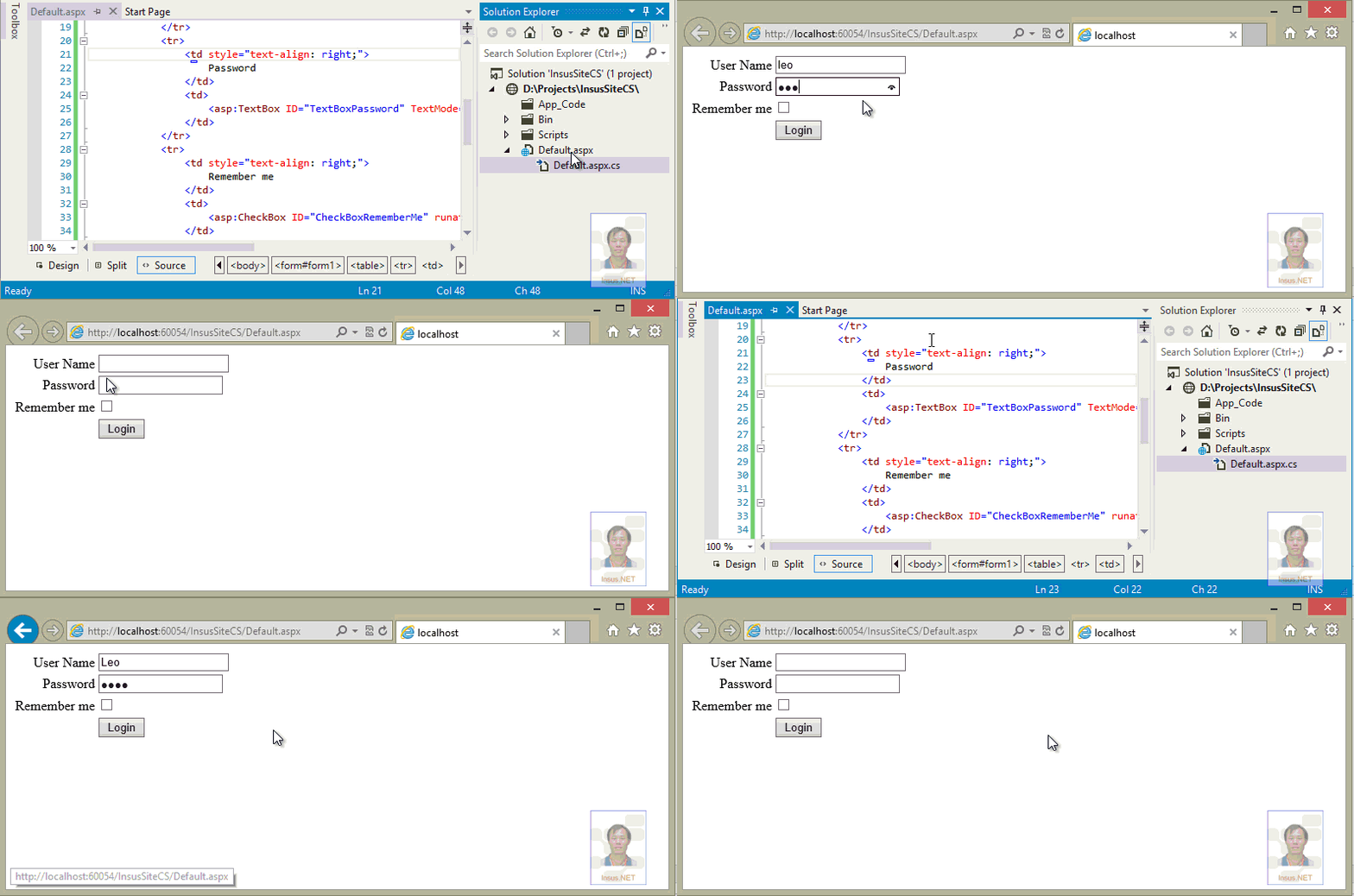
看看操作演示,演示中有三种状态演示,第一种是没有点选CheckBox,这样的话,关闭窗口,下次再打开时,没有记住登录的信息。
第二是点选择了CheckBox,这样下次再打开窗口,还可以看到帐号与密码存储在相应的文本框中,这都是Cookie没有过期。
第三种,再点一次登录,没有点选remember me的CheckBox,这样系统又移除了Cookie:
点击查看更多内容
为 TA 点赞
评论
共同学习,写下你的评论
评论加载中...
作者其他优质文章
正在加载中



感谢您的支持,我会继续努力的~
扫码打赏,你说多少就多少
赞赏金额会直接到老师账户
支付方式
打开微信扫一扫,即可进行扫码打赏哦