

-
表单中的label
label标签不会向用户呈现任何特殊效果,它的作用是为鼠标用户改进可用性,如果你在label标签内点击文本,就会触发此控件。就是说当用户单选label标签是,浏览器会自动将焦点转到和标签相关的表单控件上(即自动选中和该label标签相关联的表单控件上)
语法:
<label for="控件id名称">
注意:label标签的for属性中的值应当与相关控件的id属性值一定要向相同
例子:
<form>
<label for="email">输入你的邮箱地址</label>
<input type="email" id="email" placeholder="Enter email">
</form>
查看全部 -
表单中文本域---<textarea></textarea>标签对
当用户需要在表单中输入大段文字时,需要用到文本输入域
语法:
<textarea rows="行数" cols="列数">文本内容</textarea>
<textarea>标签是成对出现的
cols:多行输入域的列数
rows:多行输入域的行数
在<textarea></textarea>标签之间可以输入默认值
举例:
<form method="post" action="save.php">
<label>联系我们</label>
<textarea cols="50" rows="10">在这里输入内容。。。</textarea>
<form>

注意:cols和rows这两个属性,实际应用时可以用css样式中的width和heigth代替
查看全部 -
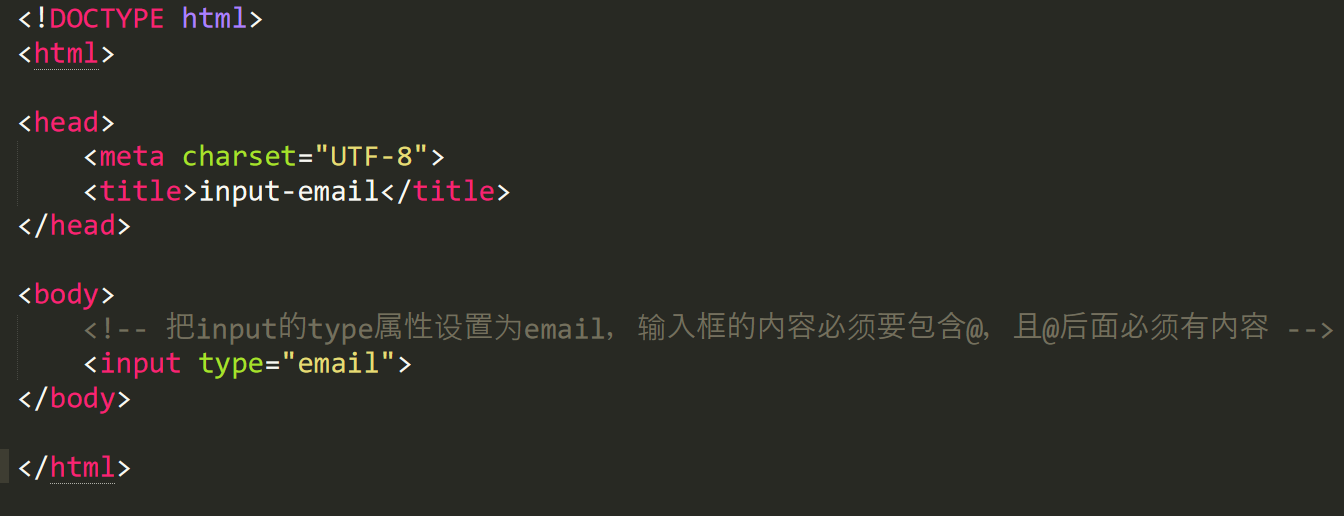
邮箱输入框---input标签的email类型


解释:
input的type类型设置为email,表示该输入框的类型为邮箱
邮箱框的值必须包含@,且其后面必须有内容,否则会报错
查看全部 -
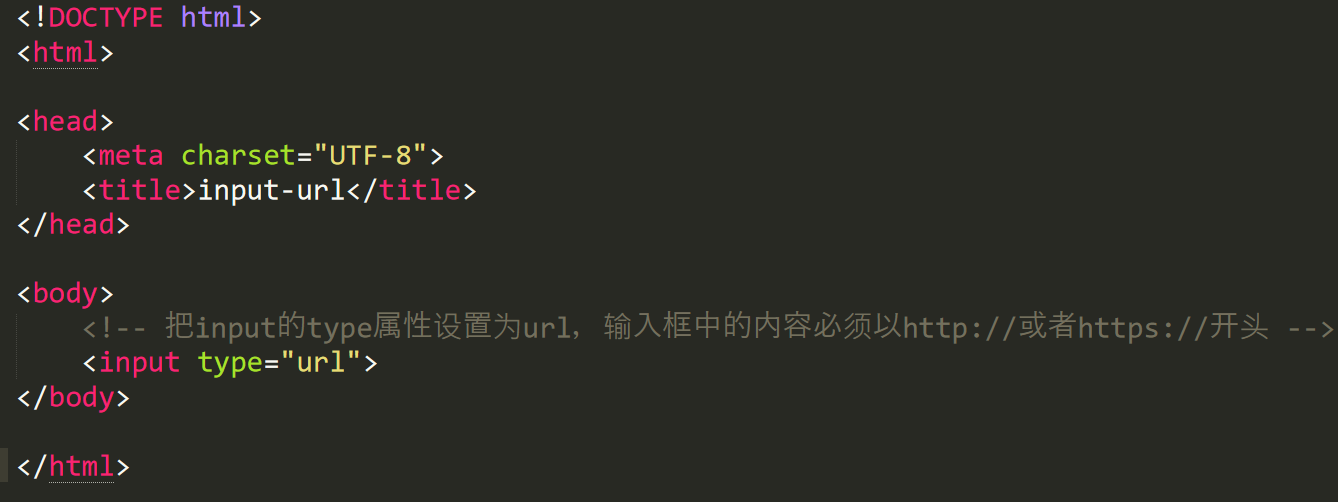
网址输入框--input标签url类型

解释:
input的type属性设置为url,则表示输入框类型为网址
网址输入框的值须以http://或https://开头,且后面必须有内容,否则表单提交的时候会报错
查看全部 -
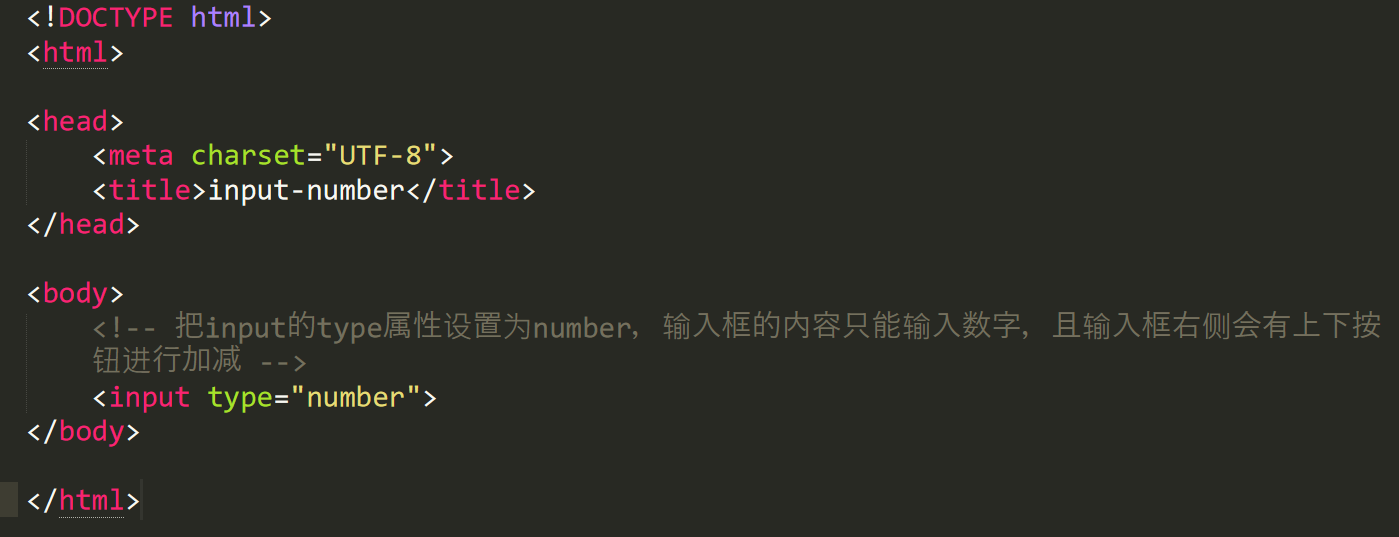
数字输入框--input标签number类型
解释:
input的type属性设置为number,则表示该输入框的类型为数字
数字框只能输入数字,其他字符无效
数字框最右侧会有一个加减符号,可以调整输入数字的大小,不同浏览器表现不一致
查看全部 -
<header>我是头部标签</header>
<section>我是一个区域</section>
<footer>我是底部标签</footer>
查看全部 -
<!DOCTYPE html>
<html>
<head>
<meta charset="UTF-8">
<title>div标签</title>
<style>
.div01{
border:6px solid;
border-color: green;
}
</style>
</head>
<body>
<div class="div01">
<h2>热门课程排行榜</h2>
<ol>
<li>前端开发面试心法 </li>
<li>零基础学习html</li>
<li>javascript全攻略</li>
</ol>
</div>
<div>
<h2>最新课程排行</h2>
<ol>
<li>版本管理工具介绍—Git篇 </li>
<li>Canvas绘图详解</li>
<li>QQ5.0侧滑菜单</li>
</ol>
</div>
</body>
</html>
查看全部 -
伪装者 - 伪类选择器
更有趣的是伪类选择符,为什么叫做伪类选择符,它允许给html不存在的标签(标签的某种状态)设置样式,比如说我们给html中一个标签元素的鼠标滑过的状态来设置字体颜色:
a:hover{color:red;}上面一行代码就是为 a 标签鼠标滑过的状态设置字体颜色变红。这样就会使第一段文字内容中的“胆小如鼠”文字加入鼠标滑过字体颜色变为红色特效。
关于伪选择符:
关于伪类选择符,到目前为止,可以兼容所有浏览器的“伪类选择符”就是 a 标签上使用 :hover 了(其实伪类选择符还有很多,尤其是 css3 中,但是因为不能兼容所有浏览器,本教程只是讲了这一种最常用的)。其实 :hover 可以放在任意的标签上,比如说 p:hover,但是它们的兼容性也是很不好的,所以现在比较常用的还是 a:hover 的组合。
查看全部 -
请注意这个选择器与子选择器的区别,子选择器(child selector)仅是指它的直接后代,或者你可以理解为作用于子元素的第一代后代。而后代选择器是作用于所有子后代元素。后代选择器通过空格来进行选择,而子选择器是通过“>”进行选择。
总结:>作用于元素的第一代后代,空格作用于元素的所有后代。
查看全部 -
表单内容--文本输入框和密码输入框
语法:
<form >
<input type="“text/password”name="名称" value="文本" />
</form>
type:
当type=“text”时,输入框为文本输入框
当type=“password”时,输入框为密码输入框
name:为文本框命名,以备后台程序ASP、PHP使用
value:为文本输入框设计默认值。(一般起到提示作用)
举例:
<form>
  姓名:
  <input type="text" name="myName">
  <br/>
  密码:
  <input type="password" name="pass">
</form>

输入框提示:占位符placeholder属性
有是需要提示用户输入框输入的内容,那么就要使用占位符。如
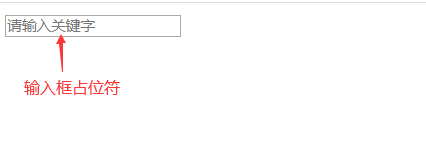
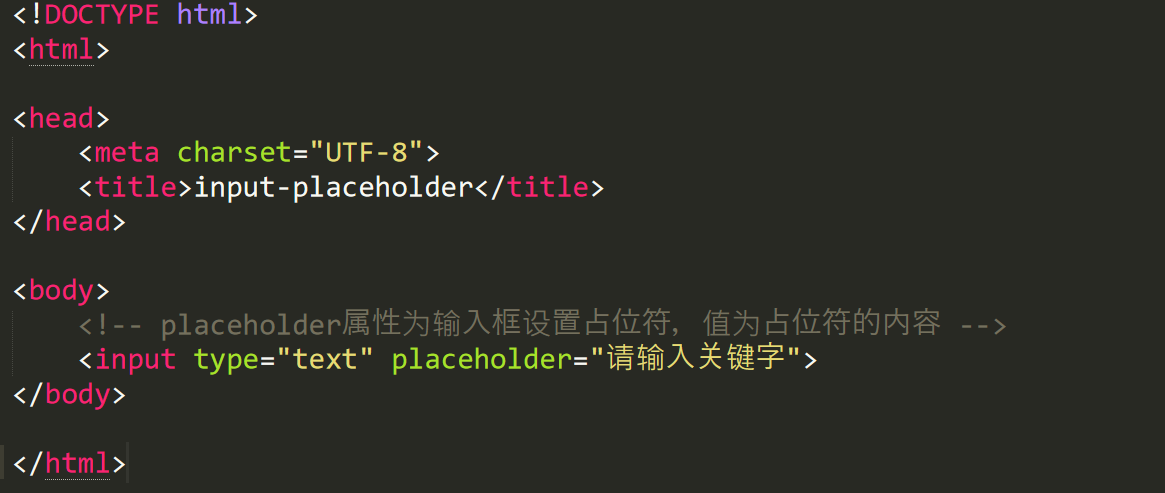
placeholder属性为输入框占位符,里面可以放提示的输入信息
placeholder属性的植可以任意填写,当输入框输入内容时,占位符内容消失,输入框无内容时,占位符内容显示
占位符内容不是输入框真正的内容
查看全部 -
表单标签:<form>创建表单
语法:<form method="传送方式" action="服务器文件">
讲解:
<form>标签:是成对出现的,以<form>开始,以</form>结束
action属性:浏览者输入的数据被传送到的地方,如一个php页面
metho:数据的传送方式(get/post)
举例:
<form    method="post"   action="save.php">
        <label for="username">用户名:</label>
        <input type="text" name="username" />
        <label for="pass">密码:</label>
        <input type="password" name="pass" />
</form>
注意:
所有表单控件(文本框.文本域、按钮、单选框、复选框等),都必须放在<form>标签对内,否则用户输入的信息可能提交不到服务器上
查看全部 -
使用thead,tbody,tfoot定义表格
<thead>标签定义表格的头部,该标签用于组合HTML表格的头部
<tbody> ...</tbody>:如果不加<thead>,<tbody>,<tfoot>,table表格加载完后才显示。加上这些表格结构,tbody包含行的内容下载完成优先显示,不必等待表格结束后再显示,同时如果表格很长,用tbody分段,可以一部分一部分的显示。意思是table可以按结构一块块的显示,不再等整个表格加载完成后显示。
<tfoot>元素用于对HTML表格中的标注(页脚)内容进行分组
thead,tfoot,以及tbody元素使您有能力对表格中的行进行分组。当创建某个表格时,如果希望希望拥有一个标题行,一些带有数据的行,以及位于底部的一个总计行。这种划分 使浏览器有能力支持独立于表格标题和页脚的表格正文滚动。当唱的表格被打印时,表格的表头和页脚可呗打印在包含表格数据的每张页面上。
1、<thead>标签表示表格头部,一般放<tr>和<th>标签。
2、<tbody>标签表示表格内容,一般放<tr>和<td>标签。
3、<tfoot>标签标签表格脚部标注,一般放<tr>和<td>标签
查看全部 -
<table>标签:表格标签
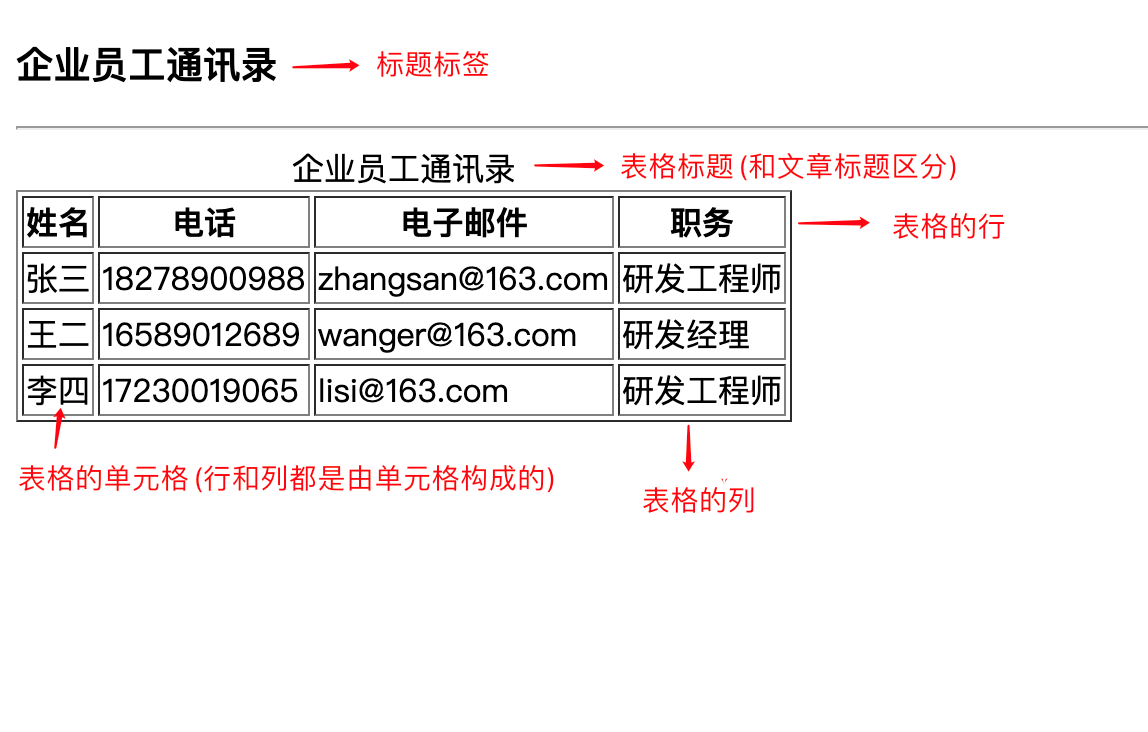
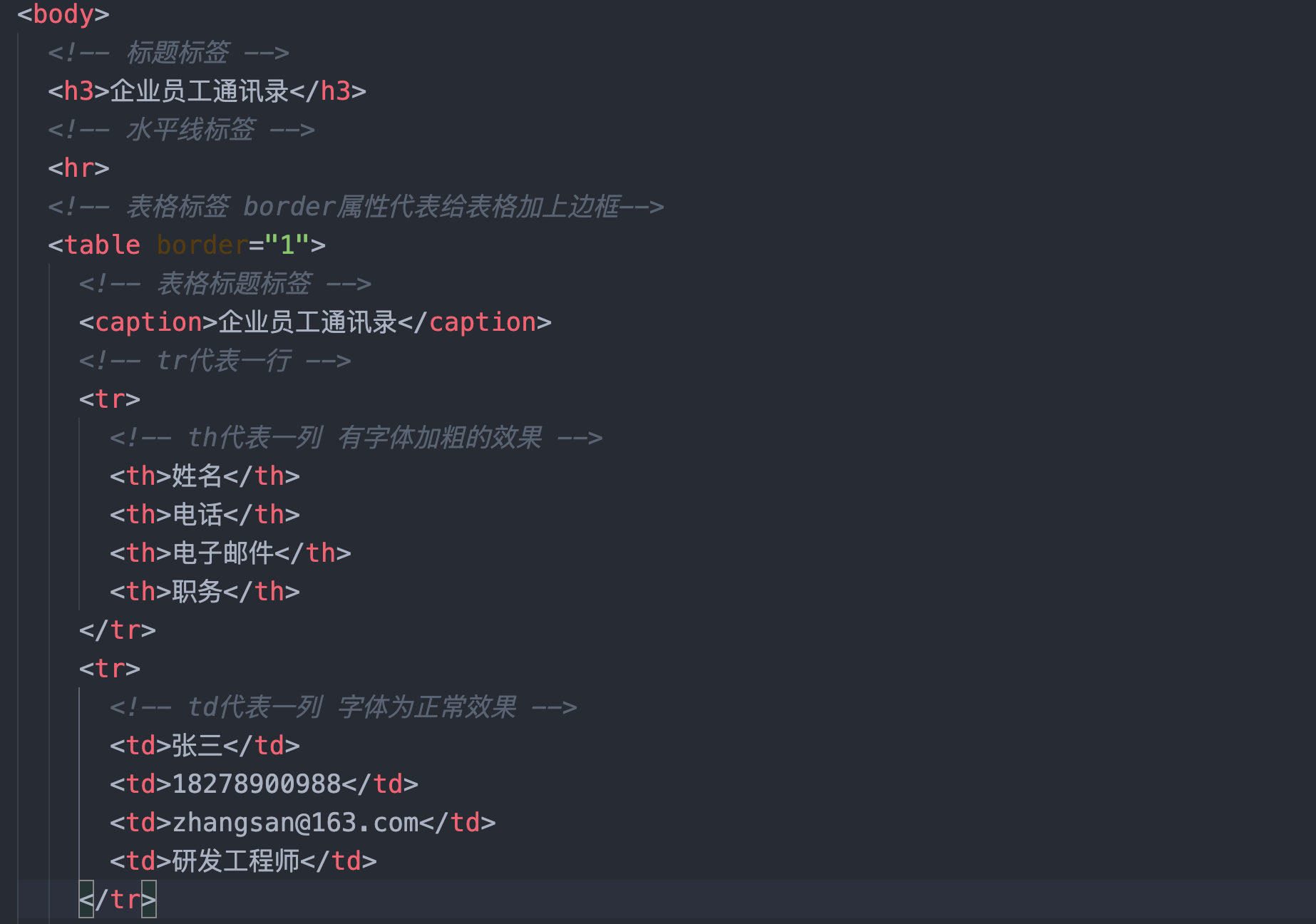
解释:创建表格的四个元素:table,tr,th,td
<table>...</table>:整个表格以<table>标记开始,</table>标记结束
<tr>...</tr>:表格的一行,所以有几对tr表格就有几行
<td>...</td>:表格的一个单元格,一个tr中包含几个td就代表表格有几列
<th>...</th>:表格头部的一个单元格,表格表头
表格中的列的个数,取决于一行中数据单元格的个数
border属性可以为表格添加边框,属性值为数字
注意:
1. table标签用了定义整个表格,为双标签,必须有结束标签
2. table标签里面可以放caption标签和tr标签
3. caption标签用来定义表格的标题
4. tr标签用来设置表格的行,tr里面只能放 th或td标签,一组tr表示一行
5. th用来设置表格的标题,会加粗居中显示,也就是th标签中的文本默认为粗体并且居中显示
6. td用来设置表格的列,一组td代表一列
7. table表格在没有添加border属性之前,在浏览器中显示是没有表格线的
查看全部 -
越靠近你要设置的目标的css优先级越高,权重高只是相比于同等位置的时候才按照权重决定css的优先级.
继承的权值最低。
查看全部 -
选择器优先级:内联样式 > id选择器 > 类选择器 > 标签选择器 > 通配符选择器
查看全部 -
网页超链接标签<a>
语法:
<a href="目标网址" title="鼠标滑过显示的文本">链接显示的文本</a>
例如:
<a href="http://www.imooc.com" title="点击进入慕课网">click here!</a>
<a>标签的target属性---在新建浏览器窗口中打开链接,可选值为"_self"和"_blank",默认值为_self,代表在当前页面打开链接,_blank代表在新窗口打开链接
查看全部


举报