

-
pydantic模块中引入BaseModel构建基本数据模型,ValidationError来捕获在对模型校验时发生的异常
从typing模块中引入List、Optional等类,方便进行类型标注
继承了BaseModel的自定义数据模型类,可以使用如下方法来达到数据的转换:
实例.dict() --> 返回python的字典类型
实例.json() --> 返回json字符串
实例.copy() --> 浅拷贝数据
类.parse_obj(obj=...) --> 将python的字典类型转换为数据模型
类.parse_raw(str) --> 将json字符串转换为数据模型
类.parse_file(path) --> 将文件内的json数据转换为数据模型
实例.schema() --> 返回schema形式的数据格式
实例.schema_json() --> 以json字符串来返回schema形式的数据
类.construct(obj=) --> 不执行数据类型校验的parse_obj
4. pydantic模型可以互相嵌套
5. 使用sqlalchemy中构建ORM模型,并在pydantic模型中建立联系
6. 使用pydantic模型类的from_orm()方法来构造ORM模型和pydantic模型的连接体模型。查看全部 -
from enum import Enum
from fastapi import APIRouter, Path

app01 = APIRouter()

"""Path Parameters and Number Validations 路径参数和数字验证"""


@app01.get("path/params")
def path_params01():
    return {"message": "This is a message"}


@app01.get("path/{params}")  # 函数的顺序就是路由的顺序
def path_params01(params: str):
    return {"message": "This is a {}".format(params)}


class CityName(str, Enum):
    Beijing = "Beijing China"
    Shanghai = "Shanghai China"


@app01.get("/enum/{city}")
async def latest(city: CityName):  # 枚举类型参数
    if city == CityName.Shanghai:
        return {"city_name": city, "confirmed": 192, "death": 8}
    if city == CityName.Beijing:
        return {"city_name": city, "confirmed": 12, "death": 1}
    return {"city_name": city, "latest": "Unknown"}


@app01.get("/files/{file_path: path}")  # 通过path parameters传递文件路径
def filepath(file_path: str):
    return f"The file path if {file_path}"


@app01.get("/path_/{num}")
def path_params_validate(
        num: int = Path(None, title="You number", description="无法描述", ge=1, le=10)
):
    return num
查看全部 -
安装包
1,包的版本问题
存在兼容性的问题
2.通过requirements.txt 安装
pip install requirements.txt
查看全部 -
from datetime import datetime
from pathlib import Path
from typing import List, Optional
from pydantic import BaseModel, ValidationError, constr
from sqlalchemy import Column, Integer, String
from sqlalchemy.dialects.postgresql import ARRAY
from sqlalchemy.ext.declarative import declarative_base
print("\033[31m1. --- Pydantic的基本用法。Pycharm可以安装Pydantic插件 ---\033[0m")
class User(BaseModel):
id: int
name: str = "john snow"
signup_ts: datetime
friends: List[int] = []
external_data = {
"id": "123",
"signup_ts": "2021-08-09 11:12:30",
"friends": ["1", 2, 4]
}
# if __name__ == '__main__':
user = User(**external_data)
print(user.id, user.name)
print(user.dict())
print("\033[31m2. --- 校验失败处理 ---\033[0m")
try:
u = User(id=1, signup_ts=datetime.today(), friends=['not a number', 1])
print(u)
except ValidationError as e:
print(e.json())
print("\033[31m3. --- 模型类的属性和方法 ---\033[0m")
print(user.dict())
print(user.json())
print(user.copy())
# 类方法
print("类方法")
print(User.parse_obj(external_data))
print(User.parse_raw('{"id": 123, "name": "john snow", "signup_ts": "2021-08-09T11:12:30", "friends": [1, 2, 4]}'))
file = Path("pydanic_tutorial.json")
file.write_text('{"id": 123, "name": "john snow", "signup_ts": "2021-08-09T11:12:30", "friends": [1, 2, 4]}')
print(User.parse_file(file))
print(user.schema())
print(user.schema_json())
# 不校验属性, 直接构造
print(User.construct(id="sdf", signup_ts=datetime.today(), friends=['not a number', 1]))
print(User.__fields__.keys())
print("\033[31m4. --- 递归模型 ---\033[0m")
class Sound(BaseModel):
sound: str
class Dog(BaseModel):
name: str
weight: Optional[float] = None
sound: List[Sound]
# dog = Dog(name="hello kitty", weight=1.8, sound=[{"sound": "wangwang~"}, {"sound": "yingying ~"}])
# print(dog.dict())
dog1 = Dog(name="hello kitty", weight=1.8, sound=[Sound(sound="wangwang~"), Sound(sound="yingying~")])
print(dog1.dict())
print("\033[31m5. --- ORM模型:从类实例创建符合ORM对象的模型 ---\033[0m")
Base = declarative_base()
class CompanyOrm(Base):
__tablename__ = 'companies'
id = Column(Integer, primary_key=True, nullable=False)
public_key = Column(String(20), index=True, nullable=False, unique=True)
name = Column(String(63), unique=True)
domains = Column(ARRAY(String(255)))
class CompanyModel(BaseModel):
id: int
public_key: constr(max_length=20)
name: constr(max_length=63)
domains: List[constr(max_length=255)]
class Config:
orm_mode = True
co_orm = CompanyOrm(
id=123,
public_key='foobar',
name='Testing',
domains=['example.com', 'foobar.com'],
)
print(CompanyModel.from_orm(co_orm))查看全部 -
cffi=1.4.4
python 312版本
pip install 安装报错
解决方法:
1.查询 https://pypi.org/search/?q=cffi 当前最新的包版本 [我这边查询到是cffi==1.16.0]
2.修改项目下载依赖文件
requirements.txt
将 cffi=1.4.4 修改成 cffi=1.16.0[查询的最新包的版本号]
3.重新执行命令
pip install -r .\requirements.txt
4.如果之前有根据依赖文件安装过部分包,需要删除的话执行
pip uninstall -y -r .\requirements.txt查看全部 -
重点
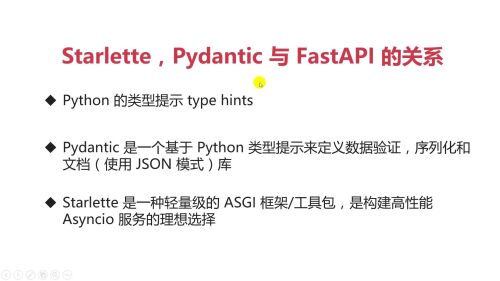 查看全部
查看全部 -
https://github.com/liaogx/fastapi-tutorial
查看全部 -
Pydantic 的实际用途:
1.替你自动检查数据格式:不用手动写一堆 if-else 判断。
2.快速发现错误:有问题会直接告诉你哪里错了。
3.确保数据 “合规”:比如 API 接口收到的参数、用户填写的表单,用它可以保证数据符合你的要求。
最常见的场景是在写后端接口时,用它来验证用户提交的数据是否正确,避免错误数据进入系统。
查看全部 -
重点
#重点
查看全部 -
1、pycharm创建项目文件
2、执行virtulenv venv
3、执行activate.bat文件,进入环境
4、执行pip install -r requirements.txt安装依赖包
第4步出现问题,本机缺少visual c++编译依赖包
查看全部 -
asgi和wsgi
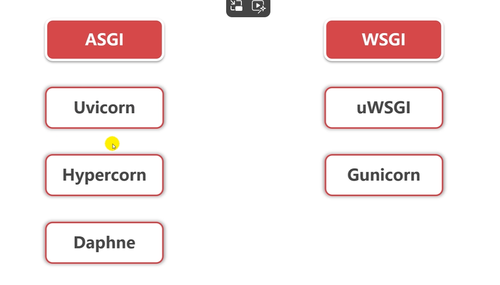 查看全部
查看全部 -
关系
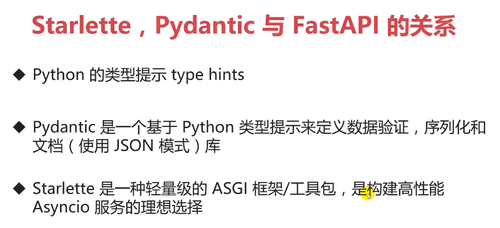
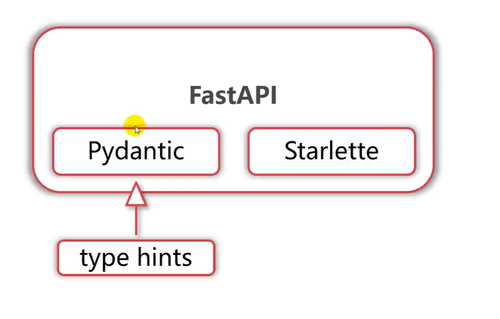 查看全部
查看全部 -
项目开发中的版本报错requierments.txt
查看全部 -
官方文档地址
imooc:http://imooc.com/article/304756
查看全部 -
在 FastAPI 中,query_string 和 query_params 是两种用于处理 URL 查询参数的方法。
query_string 是原始的、未解析的查询参数字符串。例如,在 URL http://example.com/?key=value 中,query_string 就是 key=value。
query_params 是已解析的查询参数,它是一个字典,包含了所有的查询参数和它们的值。在上面的例子中,query_params 就是 {'key': 'value'}
查看全部


举报