
appcompat-v7:21.0.0‘:没有找到与给定名称匹配的资源:ATTR’当试图在我的项目中使用最新的appcompat-v7支持库时,我会得到以下错误:/Users/greg/dev/mobile/android_project/app/build/intermediates/exploded-aar/com.android.support/appcompat-v7/21.0.0/res/values-v11/values.xmlError:(36, 21) No resource found that matches the given name: attr 'android:actionModeShareDrawable'.Error:(36, 21) No resource found that matches the given name: attr 'android:actionModeShareDrawable'.Error:(36, 21) No resource found that matches the given name: attr 'android:actionModeShareDrawable'.Error:(36, 21) No resource found that matches the given name: attr 'android:actionModeShareDrawable'.我该怎么解决这个问题?
3 回答

白猪掌柜的
TA贡献1893条经验 获得超10个赞
我只想详细说明一下所有IDE的解决方案(Eclipse、IntellJ和AndroidStudio),即使错误略有区别。
预还原
确保你下载了最新的extras以及Android 5.0 SDK通过SDK-Manager。

Android演播室
打开build.gradle您的应用程序模块的文件,并更改您的compileSdkVersion调至21。
最后,您的Gradle文件将如下所示:
android {
    compileSdkVersion 21
    // ...

    defaultConfig {
        // ...
        targetSdkVersion 21
    }}
一定要在之后同步您的项目。

月食
当使用v7-appcompat在Eclipse中,您必须将其用作库项目。仅仅将*.jar复制到您的/libs文件夹。
导入项目后,您就会意识到/res文件夹中有红色下划线,因为出现了以下错误:

error: Error retrieving parent for item: No resource found that matches the given name 'android:TextAppearance.Material'.error:
 Error retrieving parent for item: No resource found that matches the given name 'android:Widget.Material.*'error: Error:
  No resource found that matches the given name: attr 'android:actionModeShareDrawable'.
解
您唯一需要做的就是打开project.properties的文件android-support-v7-appcompat并将目标更改为target=android-19到target=android-21.
之后只要做一个Project --> Clean...使这些改变生效。
IntelliJ IDEA(不使用分级)
类似于Eclipse,仅使用android-support-v7-appcompat.jar;您必须导入appcompat作为一个模块。
(注: 如果您只使用.jar你会得到NoClassDefFoundErrors运行时)
当您试图构建项目时,您将在res/values-v**文件夹。您的消息窗口将显示如下内容:
Error:android-apt-compiler: [appcompat]  resource found that matches the given name: attr 'android:colorPrimary'.Error:(75, -1)
 android-apt-compiler: [appcompat] C:\[Your Path]\sdk\extras\android\support\v7\appcompat\res\values-v21\styles_base.xml:75: error:
 Error retrieving parent for item: No resource found that matches the given name 'android:Widget.Material.ActionButton'.// and so on
解
右击appcompat模块->打开模块设置(F4)->[依赖性标签]从下拉列表中选择AndroidAPI 21平台->Apply
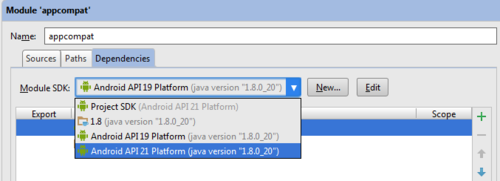
然后重建这个项目(构建->重建项目),你就可以开始了。

手掌心
TA贡献1942条经验 获得超3个赞
compileSdkVersiontargetSdkVersion
android {
    //...
    compileSdkVersion 21

    defaultConfig {
        targetSdkVersion 21
    }
    //...}
编辑:用于Eclipse或一般IntelliJ用户
- 3 回答
- 0 关注
- 721 浏览
添加回答
举报
0/150
提交
取消