
我正在尝试在如下所示的 xlsx 文件中创建 2 列的 n 个条形图。但是让我很困惑,要了解里面的类是如何org.openxmlformats.schemas.drawingml.x2006.chart工作的。我已经试过了,但是生成文件没有得到我绘制的图表。我有这个代码: Drawing drawing = planilha.createDrawingPatriarch(); ClientAnchor anchor = drawing.createAnchor(0, 0, 0, 0, 0, 5, 5, 15); Chart chart = drawing.createChart(anchor); CTChart ctChart = ((XSSFChart)chart).getCTChart(); CTPlotArea ctPlotArea = ctChart.getPlotArea(); CTBarChart ctBarChart = ctPlotArea.addNewBarChart(); CTBoolean ctBoolean = ctBarChart.addNewVaryColors(); ctBoolean.setVal(true); ctBarChart.addNewBarDir().setVal(STBarDir.COL); CellRangeAddress rangeAreas = new CellRangeAddress(1,3,1,1); CellRangeAddress rangeTotais = new CellRangeAddress(1,3,5,5); CTBarSer ctBarSer = ctBarChart.addNewSer(); CTSerTx ctSerTx = ctBarSer.addNewTx(); CTStrRef ctStrRef = ctSerTx.addNewStrRef(); ctStrRef.setF("Gráfico!"+rangeAreas.formatAsString()); CTNumDataSource ctNumDataSource = ctBarSer.addNewVal(); CTNumRef ctNumRef = ctNumDataSource.addNewNumRef(); ctNumRef.setF("Gráfico!"+rangeTotais.formatAsString()); //this code below I copied of an example and I don't know what is necessary ctBarChart.addNewAxId().setVal(123456); ctBarChart.addNewAxId().setVal(123457); CTCatAx ctCatAx = ctPlotArea.addNewCatAx(); ctCatAx.addNewAxId().setVal(123456); //id of the cat axis CTScaling ctScaling = ctCatAx.addNewScaling(); ctScaling.addNewOrientation().setVal(STOrientation.MIN_MAX); ctCatAx.addNewDelete().setVal(false); ctCatAx.addNewAxPos().setVal(STAxPos.B); ctCatAx.addNewCrossAx().setVal(123457); //id of the val axis ctCatAx.addNewTickLblPos().setVal(STTickLblPos.NEXT_TO);
1 回答

胡子哥哥
TA贡献1825条经验 获得超6个赞
使用apache poi 4.0.0,最后一个稳定版本,可以在不使用底层基础 bean 的情况下创建条形图。对于这个包 org.apache.poi.xddf.usermodel被使用。
XDDF直到现在,这些东西的某些部分还是有问题的。所以我们需要修复一些东西。但是我们应该使用这些类而不是底层的底层 bean。
您的要求示例:
来源:
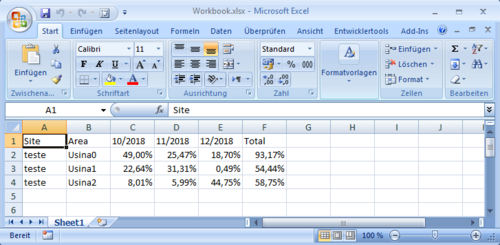
代码:
import java.io.FileOutputStream;
import java.io.FileInputStream;
import java.io.IOException;
import org.apache.poi.ss.usermodel.WorkbookFactory;
import org.apache.poi.ss.usermodel.Cell;
import org.apache.poi.ss.usermodel.Row;
import org.apache.poi.ss.util.CellRangeAddress;
import org.apache.poi.xddf.usermodel.PresetColor;
import org.apache.poi.xddf.usermodel.XDDFColor;
import org.apache.poi.xddf.usermodel.XDDFShapeProperties;
import org.apache.poi.xddf.usermodel.XDDFSolidFillProperties;
import org.apache.poi.xddf.usermodel.chart.AxisCrosses;
import org.apache.poi.xddf.usermodel.chart.AxisCrossBetween;
import org.apache.poi.xddf.usermodel.chart.AxisPosition;
import org.apache.poi.xddf.usermodel.chart.ChartTypes;
import org.apache.poi.xddf.usermodel.chart.LegendPosition;
import org.apache.poi.xddf.usermodel.chart.XDDFCategoryAxis;
import org.apache.poi.xddf.usermodel.chart.XDDFChartData;
import org.apache.poi.xddf.usermodel.chart.XDDFChartLegend;
import org.apache.poi.xddf.usermodel.chart.XDDFDataSource;
import org.apache.poi.xddf.usermodel.chart.XDDFDataSourcesFactory;
import org.apache.poi.xddf.usermodel.chart.XDDFNumericalDataSource;
import org.apache.poi.xddf.usermodel.chart.XDDFValueAxis;
import org.apache.poi.xssf.usermodel.XSSFChart;
import org.apache.poi.xssf.usermodel.XSSFClientAnchor;
import org.apache.poi.xssf.usermodel.XSSFDrawing;
import org.apache.poi.xssf.usermodel.XSSFSheet;
import org.apache.poi.xssf.usermodel.XSSFWorkbook;
public class ExcelBarChartFromExistingData {
public static void main(String[] args) throws IOException {
try (XSSFWorkbook wb = (XSSFWorkbook)WorkbookFactory.create(new FileInputStream("Workbook.xlsx"))) {
XSSFSheet sheet = wb.getSheet("Sheet1");
XSSFDrawing drawing = sheet.createDrawingPatriarch();
XSSFClientAnchor anchor = drawing.createAnchor(0, 0, 0, 0, 0, 5, 10, 15);
XSSFChart chart = drawing.createChart(anchor);
XDDFChartLegend legend = chart.getOrAddLegend();
legend.setPosition(LegendPosition.TOP_RIGHT);
// Use a category axis for the bottom axis.
XDDFCategoryAxis bottomAxis = chart.createCategoryAxis(AxisPosition.BOTTOM);
XDDFValueAxis leftAxis = chart.createValueAxis(AxisPosition.LEFT);
leftAxis.setCrosses(AxisCrosses.AUTO_ZERO);
leftAxis.setCrossBetween(AxisCrossBetween.BETWEEN);
XDDFDataSource<String> xs = XDDFDataSourcesFactory.fromStringCellRange(sheet,
new CellRangeAddress(1, 3, 1, 1));
XDDFNumericalDataSource<Double> ys = XDDFDataSourcesFactory.fromNumericCellRange(sheet,
new CellRangeAddress(1, 3, 5, 5));
XDDFChartData data = chart.createData(ChartTypes.BAR, bottomAxis, leftAxis);
data.addSeries(xs, ys);
chart.plot(data);
//Since XDDF stuff is buggy until now, we need to repair something.
//repairing set the kind of bar char, either bar chart or column chart:
if (chart.getCTChart().getPlotArea().getBarChartArray(0).getBarDir() == null)
chart.getCTChart().getPlotArea().getBarChartArray(0).addNewBarDir();
chart.getCTChart().getPlotArea().getBarChartArray(0).getBarDir().setVal(
org.openxmlformats.schemas.drawingml.x2006.chart.STBarDir.COL);
//org.openxmlformats.schemas.drawingml.x2006.chart.STBarDir.BAR);
//repairing telling the axis Ids in bar chart:
if (chart.getCTChart().getPlotArea().getBarChartArray(0).getAxIdList().size() == 0) {
chart.getCTChart().getPlotArea().getBarChartArray(0).addNewAxId().setVal(bottomAxis.getId());
chart.getCTChart().getPlotArea().getBarChartArray(0).addNewAxId().setVal(leftAxis.getId());
}
//repairing no Tx when there is no title
if (chart.getCTChart().getPlotArea().getBarChartArray(0).getSerArray(0).getTx() != null)
chart.getCTChart().getPlotArea().getBarChartArray(0).getSerArray(0).unsetTx();
XDDFSolidFillProperties fill = new XDDFSolidFillProperties(XDDFColor.from(PresetColor.BLUE));
XDDFChartData.Series firstSeries = data.getSeries().get(0);
XDDFShapeProperties properties = firstSeries.getShapeProperties();
if (properties == null) {
properties = new XDDFShapeProperties();
}
properties.setFillProperties(fill);
firstSeries.setShapeProperties(properties);
// Write the output to a file
try (FileOutputStream fileOut = new FileOutputStream("WorkbookNew.xlsx")) {
wb.write(fileOut);
}
}
}
}
结果:
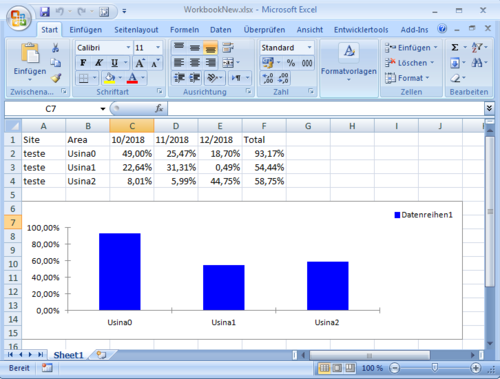
要回答你隐含的问题如何理解里面的类org.openxmlformats.schemas.drawingml.x2006.chart:
要知道这一点,我们需要知道如何Excel存储它的数据。这些*.xlsx文件只是ZIP档案。所以我们可以简单地解压缩它们并查看。
在那里我们找到XML文件。以图表/xl/charts/chart1.xml为例。现在首先我们需要了解 XML.
然后我们需要关于org.openxmlformats.schemas.drawingml.x2006.chart包的信息。我们可以下载ooxml-schemas-1.4-sources.jar,然后这样做javadoc。现在我们有一个API包含所有底层 bean的文档包org.openxmlformats.schemas.drawingml.x2006.chart。
添加回答
举报
0/150
提交
取消