
我的 XML 布局需要帮助,因为我需要将 Toolbar、FrameLayout、BottomNavigationView 放在一个活动中,下面是我的代码,工具栏没有出现的问题只有 FrameLayout 和 BottomNavigationView<android.support.constraint.ConstraintLayout android:layout_width="match_parent" android:layout_height="match_parent" xmlns:app="http://schemas.android.com/apk/res-auto" android:fitsSystemWindows="true" xmlns:android="http://schemas.android.com/apk/res/android"> <include android:id="@+id/app_bar" android:layout_height="wrap_content" android:layout_width="wrap_content" app:layout_constraintLeft_toLeftOf="parent" app:layout_constraintRight_toRightOf="parent" app:layout_constraintTop_toTopOf="parent" layout="@layout/app_bar_layout" /> <FrameLayout android:id="@+id/activity_content" android:layout_width="match_parent" android:layout_height="match_parent" app:layout_constraintLeft_toLeftOf="parent" app:layout_constraintRight_toRightOf="parent" app:layout_constraintTop_toTopOf="@+id/bottom_navigation" app:layout_constraintTop_toBottomOf="@+id/app_bar" /> <View android:id="@+id/horizontalDivider" android:layout_width="match_parent" android:layout_height="0.3dp" android:layout_above="@+id/bottom_navigation" android:layout_gravity="center_vertical" android:background="@android:color/black" /> <include android:id="@+id/bottom_navigation" layout="@layout/bottom_navigation" android:layout_alignParentBottom="true" app:layout_constraintBottom_toBottomOf="parent" app:layout_constraintLeft_toLeftOf="parent" app:layout_constraintRight_toRightOf="parent" android:layout_height="wrap_content" android:layout_width="match_parent" /></android.support.constraint.ConstraintLayout>
1 回答

Helenr
TA贡献1780条经验 获得超4个赞
试试这个
<android.support.constraint.ConstraintLayout xmlns:android="http://schemas.android.com/apk/res/android"
xmlns:app="http://schemas.android.com/apk/res-auto"
android:layout_width="match_parent"
android:layout_height="match_parent">
<include
android:id="@+id/app_bar"
layout="@layout/aa"
android:layout_width="match_parent"
android:layout_height="wrap_content"
app:layout_constraintLeft_toLeftOf="parent"
app:layout_constraintRight_toRightOf="parent"
app:layout_constraintTop_toTopOf="parent" />
<FrameLayout
android:id="@+id/activity_content"
android:layout_width="match_parent"
android:layout_height="0dp"
android:background="@color/colorAccent"
app:layout_constraintBottom_toTopOf="@+id/horizontalDivider"
app:layout_constraintHorizontal_bias="0.5"
app:layout_constraintLeft_toLeftOf="parent"
app:layout_constraintRight_toRightOf="parent"
app:layout_constraintTop_toBottomOf="@+id/app_bar" />
<View
android:id="@+id/horizontalDivider"
android:layout_width="match_parent"
android:layout_height="5dp"
android:layout_gravity="center_vertical"
android:background="@android:color/black"
app:layout_constraintBottom_toTopOf="@+id/bottom_navigation"
app:layout_constraintLeft_toLeftOf="parent"
app:layout_constraintRight_toRightOf="parent"
app:layout_constraintTop_toBottomOf="@+id/activity_content" />
<include
android:id="@+id/bottom_navigation"
layout="@layout/aa"
android:layout_width="match_parent"
android:layout_height="wrap_content"
app:layout_constraintBottom_toBottomOf="parent"
app:layout_constraintStart_toStartOf="parent"
app:layout_constraintTop_toBottomOf="@+id/horizontalDivider" />
</android.support.constraint.ConstraintLayout>
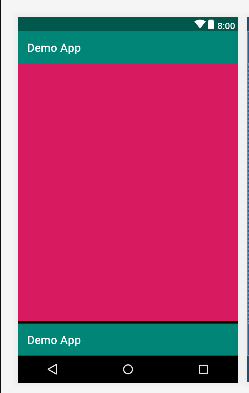
输出
添加回答
举报
0/150
提交
取消