
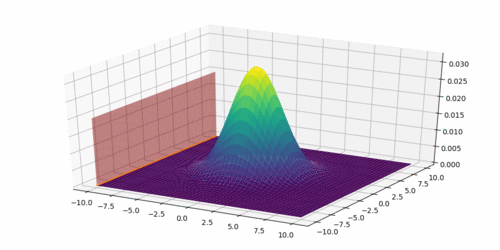
我有以下代码和它生成的图。我的目标是在第二个图(右)上绘制红色平面上的一维高斯分布。这样做的目的是表明重叠(表示条件)是高斯分布。我对正确的分布的确切方差不感兴趣,而只是直观地显示这一点。在python中有没有直接的方法来做到这一点?谢谢,Pimport numpy as npimport matplotlib.pyplot as pltfrom matplotlib.mlab import bivariate_normalfrom mpl_toolkits.mplot3d import Axes3D#Make a 3D plotfig = plt.figure(figsize=plt.figaspect(0.5))################ First Plot ###############Parameters to setmu_x = 0sigma_x = np.sqrt(5)mu_y = 0sigma_y = np.sqrt(5)#Create grid and multivariate normalx = np.linspace(-10,10,500)y = np.linspace(-10,10,500)X, Y = np.meshgrid(x,y)Z = bivariate_normal(X,Y,sigma_x,sigma_y,mu_x,mu_y)# Create planex_p = 2y_p = np.linspace(-10,10,500)z_p = np.linspace(0,0.02,500)Y_p, Z_p = np.meshgrid(y_p, z_p)# ax = fig.gca(projection='3d')ax = fig.add_subplot(1,2,1, projection='3d')ax.plot_surface(X, Y, Z, cmap='viridis',linewidth=0)ax.plot_surface(x_p, Y_p, Z_p, color='r',linewidth=0, alpha=0.5)plt.tight_layout()################ Second Plot ##############x_p = 2y_p = np.linspace(-10,10,500)z_p = np.linspace(0,0.02,500)Y_p, Z_p = np.meshgrid(y_p, z_p)# ax2 = fig.gca(projection='3d')ax2 = fig.add_subplot(1,2,2,projection='3d')ax2.plot_surface(x_p, Y_p, Z_p, color='r',linewidth=0, alpha=0.3)plt.show()
1 回答

Helenr
TA贡献1780条经验 获得超4个赞
例如,您可以尝试使用np.where获取与计划X公差范围内的最近坐标,然后使用生成的索引作为掩码来选择对应的和值。这将导致您进入以下代码:tolx_p = 2idx_x_pYZ
import numpy as np
import matplotlib.pyplot as plt
from matplotlib.mlab import bivariate_normal
from mpl_toolkits.mplot3d import Axes3D
#Parameters to set for Gaussian distribution
mu_x = 0
sigma_x = np.sqrt(5)
mu_y = 0
sigma_y = np.sqrt(5)
#Create grid and multivariate normal
x = np.linspace(-10,10,500)
y = np.linspace(-10,10,500)
X, Y = np.meshgrid(x,y)
Z = bivariate_normal(X,Y,sigma_x,sigma_y,mu_x,mu_y)
# Create plane
x_p = 2
y_p = np.linspace(-10,10,500)
z_p = np.linspace(0,0.02,500)
Y_p, Z_p = np.meshgrid(y_p, z_p)
# Finding closest idx values of X mesh to x_p
tol = 1e-4
idx_x_p = (np.where(x < x_p+tol) and np.where(x > x_p-tol))[0][0]
# Select the corresponding values of X, Y, Z (carefully switch X and Y)
x_c, y_c, z_c = Y[idx_x_p], X[idx_x_p], Z[idx_x_p]
# Plot
fig = plt.figure(figsize=plt.figaspect(0.5))
ax = fig.add_subplot(1, 1, 1, projection='3d')
ax.plot_surface(X, Y, Z, cmap='viridis',linewidth=0,zorder=0)
ax.plot_surface(x_p, Y_p, Z_p, color='r',linewidth=0, alpha=0.5,zorder=5)
ax.plot(x_c,y_c,z_c,zorder=10)
plt.tight_layout()
x_p它显示了不同值的高斯形重叠。让我们说x_p in np.linspace(-10,10,20):
添加回答
举报
0/150
提交
取消