
我正在尝试制作动态表格,允许人们将多个牙齿数据添加到数据库中。我遇到的问题是,在提交表单后,我无法访问给定的变量和数组(复选框)只有 1 个值(第一个)。为了生成我使用 jQuery 的表单,关于牙齿的数据是复选框。生成表单动态部分的代码:<script type="text/javascript"> function add_row() { $rowno=$("#teeth_table tr").length; $rowno=$rowno+1; $("#teeth_table tr:last").after("<tr id='row"+$rowno+"'>" + "<td style='margin-left: 15px'> Quarter <input type='number' name='quarter[]' min='1' max='4' placeholder='1-4'></td>" + "<td style='margin-left: 15px'> Tooth number <input type='number' name='number[]' min='1' max='8' placeholder='1-8'></td>" + "<td style='margin-left: 15px'> Description <input type='text' name='desc[]'></td>" + "<td style='margin-left: 15px'> Measurement <input type='text' name='measure[]'></td>" + "<td style='margin-left: 15px'><input type='button' value='DELETE' onclick=delete_row('row"+$rowno+"')></td></tr>"); } function delete_row(rowno) { $('#'+rowno).remove(); }</script>
2 回答

阿波罗的战车
TA贡献1862条经验 获得超6个赞
我试过你的代码,对我来说看起来不错。
我将向您展示我的输出,以便您验证这是否是您想要的正确行为。
输入这些值:

将导致您的 PHP 输出:
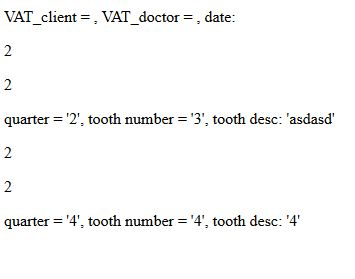
对我来说,它看起来确实正确。您能否验证并告诉我您仍然遇到什么错误?你得到相同的输出吗?

小怪兽爱吃肉
TA贡献1852条经验 获得超1个赞
我通过从动态表单传递帖子变量解决了这个问题。我通过 GET 方法传递的其他变量。我只是设法通过 post 传递了一个变量,我将它作为一个数组传递,其中值作为第一个元素,其余的是空元素。
<form method='post' action='dental_chart.php?VAT_client=$VAT_client_g&VAT_doctor=$VAT_doctor_g&date=$date_g'>
<p>Description:
<input type='text' name='description[]' placeholder='describe procedure'/>
</p>
<hr>
<h4>Insert procedure charting data - gap per tooth:</h4>
<p></p>
<div style='margin-left: 20px'>
<table id='teeth_table'>
<tr id='row1'>
<td style='margin-left: 15px'> Quarter <input type='number' name='quarter[]' min='1' max='4' placeholder='1-4'></td>
<td style='margin-left: 15px'> Tooth number <input type='number' name='number[]' min='1' max='8' placeholder='1-8'></td>
<td style='margin-left: 15px'> Description <input type='text' name='desc[]'></td>
<td style='margin-left: 15px'> Measurement <input type='text' name='measure[]'></td>
</tr>
</table>
- 2 回答
- 0 关注
- 198 浏览
添加回答
举报
0/150
提交
取消