
我已经找到了很多关于这个问题的答案,但无论我尝试什么,似乎都不起作用。我正在尝试在 UWP 应用程序中创建用户控件。用户控件由边框组成,边框内有图像和文本块。我设法让TextBlock文本显示出来,但无论我做什么,我似乎都无法获得图像显示在UserControl中。到目前为止,事情已经尝试过:将“图形属性类型”更改为“图像”、“图像源”和“Uri”。将边框中的图像放入内容预览中。在这一点上,我不记得其他事情。我不知道如何让它工作。我知道我以前做过这件事,但那是几年前的事了,我显然已经意识到了如何(或者UWP发生了重大变化,因为我的大部分经验都是在WPF中)。有人可以帮忙找到我在哪里搞砸了吗?用户控制 XAML:<UserControl x:Class="ShirtSleeves.CardControlxaml" xmlns="http://schemas.microsoft.com/winfx/2006/xaml/presentation" xmlns:x="http://schemas.microsoft.com/winfx/2006/xaml" xmlns:local="using:ShirtSleeves" xmlns:d="http://schemas.microsoft.com/expression/blend/2008" xmlns:mc="http://schemas.openxmlformats.org/markup-compatibility/2006" x:Name="CardControl" mc:Ignorable="d" d:DesignHeight="400" d:DesignWidth="300"> <Grid> <Border Margin="0,10" Background="White" BorderBrush="Black" BorderThickness="5" Width="260" Height="352" CornerRadius="20"> <Grid> <Grid.RowDefinitions> <RowDefinition Height="Auto"/> <RowDefinition Height="Auto" /> </Grid.RowDefinitions> <Image Source="{Binding ElementName=CardControl, Path=Graphic}" Height="200" Width="200" HorizontalAlignment="Center" VerticalAlignment="Bottom" /> <TextBlock Text="{Binding ElementName=CardControl, Path=Label}" Grid.Row="1" HorizontalAlignment="Center" VerticalAlignment="Top" Margin="0,30" Foreground="Black" FontSize="48" FontWeight="Bold" /> </Grid> </Border> </Grid></UserControl>
1 回答

HUX布斯
TA贡献1876条经验 获得超6个赞
UWP 不允许直接访问应用容器外部的文件。这意味着您无法像这样设置图像源。C:\Users\<username>\source\repos\ShirtSleeves\ShirtSleeves\Images\Rook (Games).png
在您的例子中,最简单的方法是将图像放入项目的 Assets 文件夹中,如下所示:
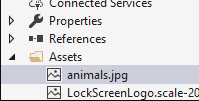
然后,您可以指定“图形”属性,如下所示:
<local:CardControlxaml Label="Search" Graphic="Assets/animals.jpg" Foreground="Black" />
有关详细信息,请阅读文件访问权限。
- 1 回答
- 0 关注
- 107 浏览
添加回答
举报
0/150
提交
取消