
概括这个问题是用 JavaScript 写的,但是用任何语言、伪代码或数学来回答都会很棒!我一直在尝试实现分离轴定理来完成以下任务:检测凸多边形和圆之间的交点。找出可应用于圆的平移以解决相交问题,使圆几乎不接触多边形,但不再在内部。确定碰撞的轴(问题末尾的详细信息)。我已成功完成第一个要点,您可以在问题末尾看到我的 javascript 代码。我在其他部分有困难。解决交集网上有很多关于如何解决圆最小/最短重叠方向上的交点的例子。您可以在最后的代码中看到我已经计算过了。但是,这不适合我的需要。我必须解决与圆轨迹相反方向的碰撞(假设我已经有了圆的轨迹,并希望将它作为单位向量或角度传递给我的函数,以适合者为准)。您可以在下图中看到最短分辨率和预期分辨率之间的差异:如何计算最小平移向量以解决test_CIRCLE_POLY函数内部的交点,但这将应用于特定方向,与圆的轨迹相反?我的想法/尝试:我的第一个想法是在必须在 SAT 算法中测试的轴上添加一个附加轴,该轴将垂直于圆的轨迹。然后我会在投影到这个轴上时根据重叠来解决。这会有点工作,但在大多数情况下会解决得很远。它不会导致最低翻译。所以这不会令人满意。我的第二个想法是继续使用最短重叠的幅度,但将方向更改为与圆的轨迹相反。这看起来很有希望,但可能有很多我没有考虑到的极端情况。也许这是一个不错的起点。确定碰撞侧/轴我想出了一种方法来确定圆与多边形的哪些边相撞。对于多边形的每个测试轴,我会简单地检查重叠。如果有重叠,那一侧就会发生碰撞。这个解决方案将不再被接受,因为我只想根据圆的轨迹找出一侧。我的预期解决方案会告诉我,在下面的示例图像中,轴 A 是碰撞轴,而不是轴 B。这是因为一旦解决了交点,轴 A 就是对应于多边形边的轴只是勉强接触到圆圈。我的想法/尝试:目前我假设碰撞轴垂直于 MTV(最小平移向量)。这目前是不正确的,但是一旦我在问题的前半部分更新了交叉点解析过程,它应该是正确的轴。所以这部分应该首先解决。或者,我考虑从圆的先前位置及其当前位置+半径创建一条线,并检查哪些边与这条线相交。但是,仍然存在歧义,因为有时会有不止一侧与线相交。
4 回答

jeck猫
TA贡献1909条经验 获得超7个赞
我假设多边形是凸的,并且圆沿着直线移动(至少在一段可能很小的时间间隔内)并且没有遵循一些弯曲的轨迹。如果它遵循弯曲的轨迹,那么事情就会变得更加困难。在曲线轨迹的情况下,可以保留基本概念,但实际的碰撞点(圆的碰撞分辨率点)可能更难计算。不过,我正在概述一个想法,它也可以扩展到这种情况。另外,它可以作为圆和凸多边形之间碰撞检测的主要方法。
我没有考虑所有可能的情况,可能包括特殊或极端的情况,但至少它给了你一个探索的方向。
在你的脑海中将圆和多边形之间的碰撞转换为圆心(一个点)和一个由圆的半径加厚的多边形版本之间的碰撞r,即(i)多边形的每条边都是偏移的(翻译) 沿垂直于它的向量向外半径r并指向多边形外部,(ii) 顶点变成半径为 的圆弧r,以多边形顶点为中心并连接适当的相邻偏移边的端点(基本上,放置半径的圆r在多边形的顶点并取它们的凸包)。
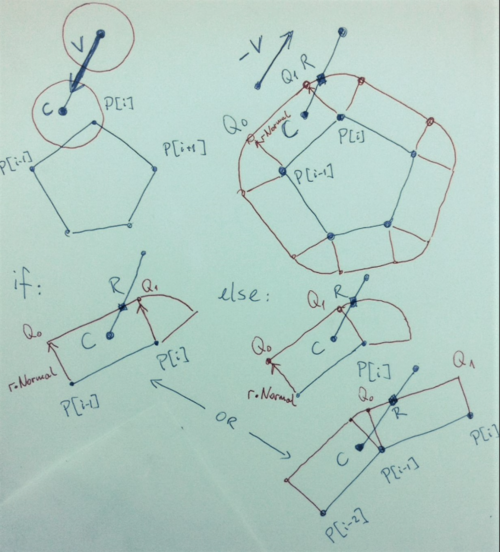
现在,圆心的当前位置是C = [ C[0], C[1] ]并且它一直沿直线移动,方向矢量V = [ V[0], V[1] ]指向运动方向(或者如果您愿意,可以将其V视为圆在检测到的那一刻的速度)碰撞)。然后,有一个由向量方程定义的轴(或者说是一条射线 - 一条有向半线)X = C - t * V,其中t >= 0(该轴指向过去的轨迹)。基本上,这是通过中心点C并与向量对齐/平行的半线V。现在,分辨率点,即您要将圆圈移动到的点是轴X = C - t * V与加厚多边形边界相交的点。
因此,您必须检查 (1) 第一个轴相交的边缘,然后 (2) 轴与与原始多边形顶点有关的圆弧相交。
P = [ P[0], P[1], ..., P[N], P[0] ]假设多边形由逆时针方向的顶点数组给出。
(1)对于原始多边形的每条边P[i-1]P[i],与您的碰撞相关(这些可能是在检测到碰撞的顶点处相交的两条相邻边,或者在圆移动的情况下实际上可能是所有边非常高的速度并且您很晚才检测到碰撞,因此实际碰撞甚至没有发生在那里,我把这留给您,因为您更了解您的情况的细节)执行以下操作。您有作为输入数据:
C = [ C[0], C[1] ]
V = [ V[0], V[1] ]
P[i-1] = [ P[i-1][0], P[i-1][1] ]
P[i] = [ P[i][0], P[i][1] ]
做:
Normal = [ P[i-1][1] - P[i][1], P[i][0] - P[i-1][0] ];
Normal = Normal / sqrt((P[i-1][1] - P[i][1])^2 + ( P[i][0] - P[i-1][0] )^2);
// you may have calculated these already
Q_0[0] = P[i-1][0] + r*Normal[0];
Q_0[1] = P[i-1][1] + r*Normal[1];
Q_1[0] = P[i][0]+ r*Normal[0];
Q_1[1] = P[i][1]+ r*Normal[1];
求解s, t线性方程组(相交方程):
Q_0[0] + s*(Q_1[0] - Q_0[0]) = C[0] - t*V[0];
Q_0[1] + s*(Q_1[1] - Q_0[1]) = C[1] - t*V[1];
如果0<= s <= 1和t >= 0,你就完成了,你的解决点是
R[0] = C[0] - t*V[0];
R[1] = C[1] - t*V[1];
别的
(2)对于与P[i]您的碰撞相关的每个顶点,请执行以下操作:求解t二次方程(有一个明确的公式)
norm(P[i] - C + t*V )^2 = r^2
或扩展:
(V[0]^2 + V[1]^2) * t^2 + 2 * ( (P[i][0] - C[0])*V[0] + (P[i][1] - C[1])*V[1] )*t + ( P[i][0] - C[0])^2 + (P[i][1] - C[1])^2 ) - r^2 = 0
或者,如果您更喜欢类似代码的方式:
a = V[0]^2 + V[1]^2;
b = (P[i][0] - C[0])*V[0] + (P[i][1] - C[1])*V[1];
c = (P[i][0] - C[0])^2 + (P[i][1] - C[1])^2 - r^2;
D = b^2 - a*c;
if D < 0 there is no collision with the vertex
i.e. no intersection between the line X = C - t*V
and the circle of radius r centered at P[i]
else
D = sqrt(D);
t1 = ( - b - D) / a;
t2 = ( - b + D) / a;
where t2 >= t1
那么你的解决点是
R[0] = C[0] - t2*V[0];
R[1] = C[1] - t2*V[1];

慕慕森
TA贡献1856条经验 获得超17个赞
这可能不是您想要的,但这里有一种方法(如果您不是在寻找完美的精度):
您可以尝试近似位置而不是计算它。
您设置代码的方式有一个很大的优势:在碰撞之前您拥有圆的最后位置。多亏了这一点,您可以通过轨迹“迭代”并尝试找到最接近交点位置的位置。我假设你已经有一个函数可以告诉你一个圆是否与多边形相交。代码(C++):
// What we need :
Vector startPos; // Last position of the circle before the collision
Vector currentPos; // Current, unwanted position
Vector dir; // Direction (a unit vector) of the circle's velocity
float distance = compute_distance(startPos, currentPos); // The distance from startPos to currentPos.
Polygon polygon; // The polygon
Circle circle; // The circle.
unsigned int iterations_count = 10; // The number of iterations that will be done. The higher this number, the more precise the resolution.
// The algorithm :
float currentDistance = distance / 2.f; // We start at the half of the distance.
Circle temp_copy; // A copy of the real circle to "play" with.
for (int i = 0; i < iterations_count; ++i) {
temp_copy.pos = startPos + currentDistance * dir;
if (checkForCollision(temp_copy, polygon)) {
currentDistance -= currentDistance / 2.f; // We go towards startPos by the half of the current distance.
}
else {
currentDistance += currentDistance / 2.f; // We go towards currentPos by the half of the current distance.
}
}
// currentDistance now contains the distance between startPos and the intersection point
// And this is where you should place your circle :
Vector intersectionPoint = startPos + currentDistance * dir;
我没有测试过这段代码,所以我希望那里没有大错误。它也没有优化,并且这种方法存在一些问题(交点可能最终在多边形内)所以它仍然需要改进,但我认为你明白了。另一个(很大,取决于你在做什么)问题是它是一个近似值而不是一个完美的答案。
弑天下
TA贡献1818条经验 获得超8个赞
圆多边形截距
如果球在移动并且你可以确保球总是在多边形之外开始,那么解决方案就相当简单了。
我们将球及其运动称为球线。它从球的当前位置开始,到球将在下一帧的位置结束。
要解决此问题,您需要找到距球线起点最近的截距。
拦截有两种。
线段(球线)与线段(多边形边)
带圆的线段(球线)(每个(仅凸)多边形角处的圆)
示例代码有一个Lines2对象,其中包含两个相关的拦截函数。截距以Vec2包含两个单位距离的形式返回。截距函数用于线(无限长)而不是线段。如果没有拦截,则返回未定义。
对于线截距Line2.unitInterceptsLine(line, result = new Vec2()),单位值 (in result) 是从起点开始沿每条线的单位距离。负值落后于开始。
考虑到球半径,每个多边形边沿其法线偏移球半径。多边形边缘具有一致的方向很重要。在示例中,法线位于直线的右侧,多边形点位于顺时针方向。
对于线段/圆的截距Line2.unitInterceptsCircle(center, radius, result = new Vec2()),单位值 (in result) 是沿直线与圆相交的单位距离。result.x将始终包含最近的截距(假设您从圆圈外开始)。如果有一个拦截,那么即使它们在同一点,也总是有两个。
例子
该示例包含所有需要的内容
感兴趣的对象是ball和poly
ball定义球及其运动。也有代码来绘制它的例子poly保存多边形的点。根据球半径将点转换为偏移线。它被优化为仅在球半径发生变化时才计算线条。
函数poly.movingBallIntercept是完成所有工作的函数。它需要一个球对象和一个可选的结果向量。
Vec2如果它接触多边形,它将返回作为球的位置。
它通过找到到偏移线和点(作为圆)的最小单位距离来做到这一点,并使用该单位距离来定位结果。
请注意,如果球在多边形内,则与角的截距是相反的。该函数Line2.unitInterceptsCircle确实提供了线进入和退出圆圈的 2 个单位距离。但是,您需要知道您是在室内还是室外才能知道使用哪一个。该示例假设您在多边形之外。
指示
移动鼠标来改变球的路径。
单击以设置球的起始位置。
Math.EPSILON = 1e-6;
Math.isSmall = val => Math.abs(val) < Math.EPSILON;
Math.isUnit = u => !(u < 0 || u > 1);
Math.TAU = Math.PI * 2;
/* export {Vec2, Line2} */ // this should be a module
var temp;
function Vec2(x = 0, y = (temp = x, x === 0 ? (x = 0 , 0) : (x = x.x, temp.y))) {
this.x = x;
this.y = y;
}
Vec2.prototype = {
init(x, y = (temp = x, x = x.x, temp.y)) { this.x = x; this.y = y; return this }, // assumes x is a Vec2 if y is undefined
copy() { return new Vec2(this) },
equal(v) { return (this.x - v.x) === 0 && (this.y - v.y) === 0 },
isUnits() { return Math.isUnit(this.x) && Math.isUnit(this.y) },
add(v, res = this) { res.x = this.x + v.x; res.y = this.y + v.y; return res },
sub(v, res = this) { res.x = this.x - v.x; res.y = this.y - v.y; return res },
scale(val, res = this) { res.x = this.x * val; res.y = this.y * val; return res },
invScale(val, res = this) { res.x = this.x / val; res.y = this.y / val; return res },
dot(v) { return this.x * v.x + this.y * v.y },
uDot(v, div) { return (this.x * v.x + this.y * v.y) / div },
cross(v) { return this.x * v.y - this.y * v.x },
uCross(v, div) { return (this.x * v.y - this.y * v.x) / div },
get length() { return this.lengthSqr ** 0.5 },
set length(l) { this.scale(l / this.length) },
get lengthSqr() { return this.x * this.x + this.y * this.y },
rot90CW(res = this) {
const y = this.x;
res.x = -this.y;
res.y = y;
return res;
},
};
const wV1 = new Vec2(), wV2 = new Vec2(), wV3 = new Vec2(); // pre allocated work vectors used by Line2 functions
function Line2(p1 = new Vec2(), p2 = (temp = p1, p1 = p1.p1 ? p1.p1 : p1, temp.p2 ? temp.p2 : new Vec2())) {
this.p1 = p1;
this.p2 = p2;
}
Line2.prototype = {
init(p1, p2 = (temp = p1, p1 = p1.p1, temp.p2)) { this.p1.init(p1); this.p2.init(p2) },
copy() { return new Line2(this) },
asVec(res = new Vec2()) { return this.p2.sub(this.p1, res) },
unitDistOn(u, res = new Vec2()) { return this.p2.sub(this.p1, res).scale(u).add(this.p1) },
translate(vec, res = this) {
this.p1.add(vec, res.p1);
this.p2.add(vec, res.p2);
return res;
},
translateNormal(amount, res = this) {
this.asVec(wV1).rot90CW().length = -amount;
this.translate(wV1, res);
return res;
},
unitInterceptsLine(line, res = new Vec2()) { // segments
this.asVec(wV1);
line.asVec(wV2);
const c = wV1.cross(wV2);
if (Math.isSmall(c)) { return }
wV3.init(this.p1).sub(line.p1);
res.init(wV1.uCross(wV3, c), wV2.uCross(wV3, c));
return res;
},
unitInterceptsCircle(point, radius, res = new Vec2()) {
this.asVec(wV1);
var b = -2 * this.p1.sub(point, wV2).dot(wV1);
const c = 2 * wV1.lengthSqr;
const d = (b * b - 2 * c * (wV2.lengthSqr - radius * radius)) ** 0.5
if (isNaN(d)) { return }
return res.init((b - d) / c, (b + d) / c);
},
};
/* END of file */ // Vec2 and Line2 module
/* import {vec2, Line2} from "whateverfilename.jsm" */ // Should import vec2 and line2
const POLY_SCALE = 0.5;
const ball = {
pos: new Vec2(-150,0),
delta: new Vec2(10, 10),
radius: 20,
drawPath(ctx) {
ctx.beginPath();
ctx.arc(this.pos.x, this.pos.y, this.radius, 0, Math.TAU);
ctx.stroke();
},
}
const poly = {
bRadius: 0,
lines: [],
set ballRadius(radius) {
const len = this.points.length
this.bRadius = ball.radius;
i = 0;
while (i < len) {
let line = this.lines[i];
if (line) { line.init(this.points[i], this.points[(i + 1) % len]) }
else { line = new Line2(new Vec2(this.points[i]), new Vec2(this.points[(i + 1) % len])) }
this.lines[i++] = line.translateNormal(radius);
}
this.lines.length = i;
},
points: [
new Vec2(-200, -150).scale(POLY_SCALE),
new Vec2(200, -100).scale(POLY_SCALE),
new Vec2(100, 0).scale(POLY_SCALE),
new Vec2(200, 100).scale(POLY_SCALE),
new Vec2(-200, 75).scale(POLY_SCALE),
new Vec2(-150, -50).scale(POLY_SCALE),
],
drawBallLines(ctx) {
if (this.lines.length) {
const r = this.bRadius;
ctx.beginPath();
for (const l of this.lines) {
ctx.moveTo(l.p1.x, l.p1.y);
ctx.lineTo(l.p2.x, l.p2.y);
}
for (const p of this.points) {
ctx.moveTo(p.x + r, p.y);
ctx.arc(p.x, p.y, r, 0, Math.TAU);
}
ctx.stroke()
}
},
drawPath(ctx) {
ctx.beginPath();
for (const p of this.points) { ctx.lineTo(p.x, p.y) }
ctx.closePath();
ctx.stroke();
},
movingBallIntercept(ball, res = new Vec2()) {
if (this.bRadius !== ball.radius) { this.ballRadius = ball.radius }
var i = 0, nearest = Infinity, nearestGeom, units = new Vec2();
const ballT = new Line2(ball.pos, ball.pos.add(ball.delta, new Vec2()));
for (const p of this.points) {
const res = ballT.unitInterceptsCircle(p, ball.radius, units);
if (res && units.x < nearest && Math.isUnit(units.x)) { // assumes ball started outside poly so only need first point
nearest = units.x;
nearestGeom = ballT;
}
}
for (const line of this.lines) {
const res = line.unitInterceptsLine(ballT, units);
if (res && units.x < nearest && units.isUnits()) { // first unit.x is for unit dist on line
nearest = units.x;
nearestGeom = ballT;
}
}
if (nearestGeom) { return ballT.unitDistOn(nearest, res) }
return;
},
}
const ctx = canvas.getContext("2d");
var w = canvas.width, cw = w / 2;
var h = canvas.height, ch = h / 2
requestAnimationFrame(mainLoop);
// line and point for displaying mouse interaction. point holds the result if any
const line = new Line2(ball.pos, ball.pos.add(ball.delta, new Vec2())), point = new Vec2();
function mainLoop() {
ctx.setTransform(1,0,0,1,0,0); // reset transform
if(w !== innerWidth || h !== innerHeight){
cw = (w = canvas.width = innerWidth) / 2;
ch = (h = canvas.height = innerHeight) / 2;
}else{
ctx.clearRect(0,0,w,h);
}
ctx.setTransform(1,0,0,1,cw,ch); // center to canvas
if (mouse.button) { ball.pos.init(mouse.x - cw, mouse.y - ch) }
line.p2.init(mouse.x - cw, mouse.y - ch);
line.p2.sub(line.p1, ball.delta);
ctx.lineWidth = 1;
ctx.strokeStyle = "#000"
poly.drawPath(ctx)
ctx.strokeStyle = "#F804"
poly.drawBallLines(ctx);
ctx.strokeStyle = "#F00"
ctx.beginPath();
ctx.arc(ball.pos.x, ball.pos.y, ball.radius, 0, Math.TAU);
ctx.moveTo(line.p1.x, line.p1.y);
ctx.lineTo(line.p2.x, line.p2.y);
ctx.stroke();
ctx.strokeStyle = "#00f"
ctx.lineWidth = 2;
ctx.beginPath();
if (poly.movingBallIntercept(ball, point)) {
ctx.arc(point.x, point.y, ball.radius, 0, Math.TAU);
} else {
ctx.arc(line.p2.x, line.p2.y, ball.radius, 0, Math.TAU);
}
ctx.stroke();
requestAnimationFrame(mainLoop);
}
const mouse = {x:0, y:0, button: false};
function mouseEvents(e) {
const bounds = canvas.getBoundingClientRect();
mouse.x = e.pageX - bounds.left - scrollX;
mouse.y = e.pageY - bounds.top - scrollY;
mouse.button = e.type === "mousedown" ? true : e.type === "mouseup" ? false : mouse.button;
}
["mousedown","mouseup","mousemove"].forEach(name => document.addEventListener(name,mouseEvents));
#canvas {
position: absolute;
top: 0px;
left: 0px;
}
<canvas id="canvas"></canvas>
Click to position ball. Move mouse to test trajectory
Vec2和Line2
为了使其更容易,矢量库将有所帮助。对于示例,我编写了一个快速Vec2和Line2对象(注意仅示例中使用的函数已经过测试,注意该对象是为性能而设计的,没有经验的编码人员应避免使用这些对象并选择更标准的矢量和线库)

智慧大石
TA贡献1946条经验 获得超3个赞
我不确定我是否正确理解了场景,但是一个有效的直接用例是,首先只使用圆形的正方形边界框,计算该正方形与多边形的交点非常快,快得多,而不是使用圆圈。一旦您检测到该正方形和多边形的交集,您需要考虑或编写最适合您的场景的精度。如果你需要比这个状态更好的精度,你可以从这里继续:从你的方形交叉点的 90° 角,你画一条 45° 的线,直到它接触你的圆,此时,它在哪里触摸,你画了一个新的正方形,但是这一次,正方形嵌入到圆中,现在让它运行,直到这个新的正方形与多边形相交,一旦相交,你就有了一个保证的圆相交。根据您需要的精度,您可以像这样简单地玩耍。我不确定你的下一个问题是什么?如果它只能是圆形轨迹的倒数,那么它必须是那个倒数,我真的不确定我在这里错过了什么。
添加回答
举报
0/150
提交
取消